
Everything you should know about certificates and PKI but are too afraid to ask
数字证书与 PKI:那些你本该了解却一直没敢问的问题
Certificates and public key infrastructure (PKI) are hard. No shit, right? I know a lot of smart people who’ve avoided this particular rabbit hole. Personally, I avoided it for a long time and felt some shame for not knowing more. The obvious result was a vicious cycle: I was too embarrassed to ask questions so I never learned.
证书和公钥基础设施(PKI)很难。没错,对吧?我认识很多聪明的人,他们一直避开这个复杂的领域。我个人也避开它很长时间,并且因为知道的太少而感到一些羞愧。显而易见的结果是一个恶性循环:我因为太尴尬而不敢提问,所以一直没有学会。
Eventually I was forced to learn this stuff because of what it enables: PKI lets you define a system cryptographically. It’s universal and vendor neutral. It works everywhere so bits of your system can run anywhere and communicate securely. It’s conceptually simple and super flexible. It lets you use TLS and ditch VPNs. You can ignore everything about your network and still have strong security characteristics. It’s pretty great.
最终我不得不学习这些内容,因为它们所实现的功能:PKI 允许你以密码学的方式定义一个系统。它是通用的,不依赖特定供应商。它可以在任何地方运行,让你的系统各部分可以在任何地方安全地通信。它的概念简单且非常灵活。它允许你使用 TLS 并放弃 VPN。即使忽略所有网络相关的内容,你仍然能拥有强大的安全特性。这非常棒。
Now that I have learned, I regret not doing so sooner. PKI is really powerful, and really interesting. The math is complicated, and the standards are stupidly baroque, but the core concepts are actually quite simple. Certificates are the best way to identify code and devices, and identity is super useful for security, monitoring, metrics, and a million other things. Using certificates is not that hard. No harder than learning a new language or database. It’s just slightly annoying and poorly documented.
现在我已经学完了,我后悔没有早点开始学习。PKI 确实非常强大,也非常有趣。数学部分很复杂,标准也繁琐复杂,但核心概念实际上相当简单。证书是识别代码和设备的最有效方式,而身份认证对于安全、监控、指标以及其他无数事情都非常有用。使用证书并不难。不比学习一门新语言或数据库更难。它只是有点烦人,而且文档也不够完善。
This is the missing manual. I reckon most engineers can wrap their heads around all the most important concepts and common quirks in less than an hour. That’s our goal here. An hour is a pretty small investment to learn something you literally can’t do any other way.
这正是我们缺失的手册。我估计大多数工程师能在不到一个小时的时间里理解所有最重要的概念和常见问题。这就是我们的目标。花一个小时学习一些你实际上无法以其他方式学习的东西,投资很小。
My motives are mostly didactic. But I’ll be using two open source projects we built at smallstep in various demonstrations: the step CLI and step certificates. To follow along you can brew install step to get both (see full install instructions here). If you prefer the easy button, spin up a free hosted authority using our Certificate Manager offering.
我的动机主要是教育性的。但我会使用我们 smallstep 公司构建的两个开源项目,在各个演示中:step CLI 和 step certificates。要跟上进度,你可以 brew install step 获取两者(安装说明请见此处)。如果你喜欢简单的方式,可以使用我们的 Certificate Manager 服务搭建一个免费的托管权威。
Let’s start with a one sentence tl;dr: the goal of certificates and PKI is to bind names to public keys. That’s it. The rest is just implementation details.
让我们用一个句子的 tl;dr 开始:证书和 PKI 的目标是将名称与公钥绑定。就是这样。其余的都是实现细节。
A broad overview and some words you should know
一个概括和一些你应该知道的术语
I’m going to use some technical terms, so let’s go ahead and define them before we start.
我将使用一些技术术语,所以在开始之前,让我们先定义它们。
An entity is anything that exists, even if it only exists logically or conceptually. Your computer is an entity. So is some code you wrote. So are you. So is the burrito you ate for lunch. So is the ghost that you saw when you were six — even if your mom was right and it was just a figment of your imagination.
一个实体是任何存在的事物,即使它只存在于逻辑上或概念上。你的电脑是一个实体。你写的某些代码也是一个实体。你也是。你中午吃的墨西哥卷饼也是一个实体。你六岁时看到的鬼魂也是一个实体——即使你妈妈是对的,那只是你想象中的产物。
Every entity has an identity. This one’s hard to define. Identity is what makes you you, ya know? On computers identity is usually represented as a bag of attributes describing some entity: group, age, location, favorite color, shoe size, whatever. An identifier is not the same as an identity. Rather, it’s a unique reference to some entity that has an identity. I’m Mike, but Mike isn’t my identity. It’s a name — identifier and name are synonyms (at least for our purposes).
每个实体都有一个身份。这很难定义。身份是你之所以成为你的东西,你知道吧?在计算机中,身份通常被表示为一组描述实体的属性:群体、年龄、位置、喜欢的颜色、鞋码,等等。标识符不等于身份。相反,它是对具有身份的实体的唯一引用。我是 Mike,但 Mike 不是我的身份。它是一个名字——标识符和名字是同义词(至少在我们的目的下是这样)。
Entities can claim that they have some particular name. Other entities might be able to authenticate that claim, confirming its truth. But a claim needn’t be related to a name: I can make a claim about anything: my age, your age, access rights, the meaning of life, etc. Authentication, in general, is the process of confirming the truth of some claim.
实体可以声称它们拥有某个特定的名字。其他实体可能能够验证这个声明,确认其真实性。但声明不必与名字有关:我可以对任何事做出声明:我的年龄、你的年龄、访问权限、生命的意义等等。一般来说,验证是一个确认某些声明真实性的过程。
A subscriber or end entity is an entity that’s participating in a PKI and can be the subject of a certificate. A certificate authority (CA) is an entity that issues certificates to subscribers — a certificate issuer. Certificates that belong to subscribers are sometimes called end entity certificates or leaf certificates for reasons that’ll become clearer once we discuss certificate chains. Certificates that belong to CAs are usually called root certificates or intermediate certificates depending on the sort of CA. Finally, a relying party is a certificate user that verifies and trusts certificates issued by a CA. To confuse matters a bit, an entity can be both a subscriber and a relying party. That is, a single entity can have its own certificate and use other certificates to authenticate remote peers (this is what happens with mutual TLS, for instance).
一个订阅者或终端实体是参与 PKI 的实体,可以是证书的主题。证书机构(CA)是向订阅者颁发证书的实体,即证书颁发者。属于订阅者的证书有时被称为终端实体证书或叶证书,一旦我们讨论证书链,原因就会变得更清晰。属于 CA 的证书通常根据 CA 的种类被称为根证书或中间证书。最后,依赖方是验证并信任 CA 颁发的证书的证书用户。为了使事情变得有点混乱,一个实体可以同时是订阅者和依赖方。也就是说,一个实体可以拥有自己的证书,并使用其他证书来验证远程对等方(例如,这就是相互 TLS 发生的情况)。
That’s enough to get us started, but if pedagogy excites you consider putting RFC 4949 on your kindle. For everyone else, let’s get concrete. How do we make claims and authenticate stuff in practice? Let’s talk crypto.
这足以让我们开始,但如果你对教学法感兴趣,可以考虑将 RFC 4949 放到你的 Kindle 上。对于其他人来说,让我们具体一点。在实践中,我们如何做出声明和验证东西?让我们谈谈加密。
MACs and signatures authenticate stuff
MACs 和签名用于验证信息
A message authentication code (MAC) is a bit of data that’s used to verify which entity sent a message, and to ensure that a message hasn’t been modified. The basic idea is to feed a shared secret (a password) along with a message through a hash function. The hash output is a MAC. You send the MAC along with the message to some recipient.
消息认证码(MAC)是一段数据,用于验证哪个实体发送了消息,并确保消息未被修改。基本原理是将一个共享密钥(密码)与消息一起输入哈希函数。哈希输出就是 MAC。你将 MAC 与消息一起发送给某个接收者。
A recipient that also knows the shared secret can produce their own MAC and compare it to the one provided. Hash functions have a simple contract: if you feed them the same input twice you’ll get the exact same output. If the input is different — even by a single bit — the output will be totally different. So if the recipient’s MAC matches the one sent with the message it can be confident that the message was sent by another entity that knows the shared secret. Assuming only trusted entities know the shared secret, the recipient can trust the message.
同样知道共享密钥的接收者可以生成自己的 MAC,并与接收到的 MAC 进行比较。哈希函数有一个简单的特性:如果你两次向其输入相同的数据,就会得到完全相同的输出。如果输入不同——即使只差一个比特——输出也会完全不同。因此,如果接收者的 MAC 与随消息发送的 MAC 匹配,它就可以确信消息是由另一个知道共享密钥的实体发送的。假设只有可信实体知道共享密钥,接收者就可以信任该消息。
Hash functions are also one-way: it’s computationally infeasible to take the output of a hash function and reconstruct its input. This is critical to maintaining the confidentiality of a shared secret: otherwise some interloper could snoop your MACs, reverse your hash function, and figure out your secrets. That’s no good. Whether this property holds depends critically on subtle details of how hash functions are used to build MACs. Subtle details that I’m not going to get into here. So beware: don’t try to invent your own MAC algorithm. Use HMAC.
哈希函数也是单向的:从哈希函数的输出重构其输入在计算上是不可行的。这对于维护共享秘密的机密性至关重要:否则某些闯入者可能会窥探你的 MAC,逆向你的哈希函数,并发现你的秘密。这可不行。这种特性是否成立取决于如何使用哈希函数来构建 MAC 的微妙细节。这些微妙细节我这里不展开。所以请注意:不要尝试自己发明 MAC 算法。使用 HMAC。
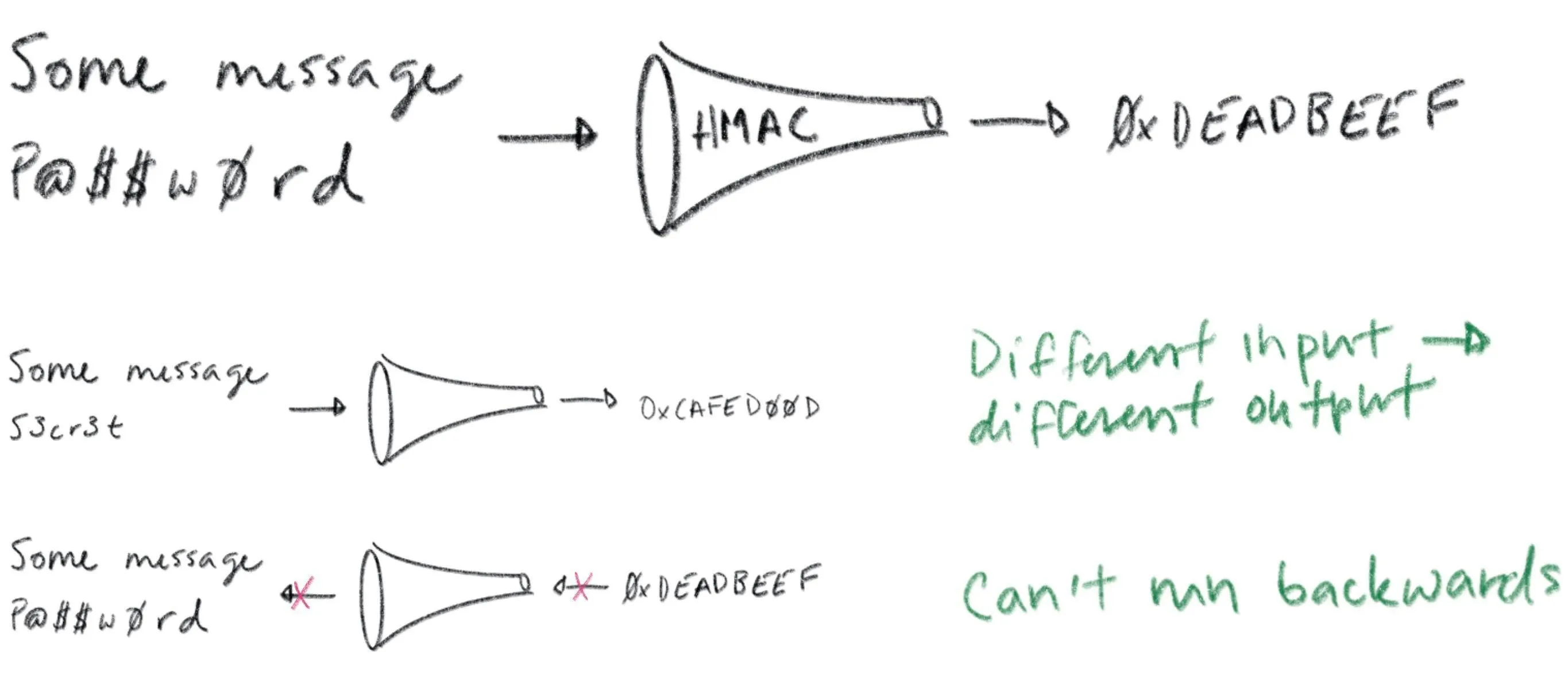
All this talk of MACs is prologue: our real story starts with signatures. A signature is conceptually similar to a MAC, but instead of using a shared secret you use a key pair (defined soon). With a MAC, at least two entities need to know the shared secret: the sender and the recipient. A valid MAC could have been generated by either party, and you can’t tell which. Signatures are different. A signature can be verified using a public key but can only be generated with a corresponding private key. Thus, a recipient that only has a public key can verify signatures, but can’t generate them. This gives you tighter control over who can sign stuff. If only one entity knows the private key you get a property called non-repudiation: the private key holder can’t deny (repudiate) the fact that they signed some data.
所有关于 MAC 的讨论都只是序幕:我们的真正故事从数字签名开始。数字签名在概念上与 MAC 相似,但使用的是密钥对(稍后定义),而不是共享密钥。使用 MAC 时,至少有两个实体需要知道共享密钥:发送方和接收方。一个有效的 MAC 可能是由任何一方生成的,而无法分辨是哪一方。签名则不同。签名可以使用公钥进行验证,但只能由相应的私钥生成。因此,只有拥有公钥的接收方可以验证签名,但不能生成它们。这让你能更严格地控制谁可以签署内容。如果只有一方知道私钥,就会得到一个称为不可否认性的特性:私钥持有者不能否认(否认)他们签署了某些数据。
If you’re already confused, chill. They’re called signatures for a reason: they’re just like signatures in the real world. You have some stuff you want someone to agree to? You want to make sure you can prove they’ve agreed later on? Cool. Write it down and have them sign it.
如果你已经感到困惑,那就放松点。之所以称为签名,是有原因的:它们和现实世界中的签名一样。你有些事情想让人同意?你想确保之后能证明他们已经同意了?好的。写下来让他们签名。
Public key cryptography lets computers see
公钥密码学让计算机能够看到
Certificates and PKI are built on public key cryptography (also called asymmetric cryptography), which uses key pairs. A key pair consists of a public key that can be distributed and shared with the world, and a corresponding private key that should be kept confidential by the owner.
证书和 PKI 基于公钥密码学(也称为非对称密码学),它使用密钥对。密钥对由一个可以分发和与世界共享的公钥,以及一个所有者应保持机密的相应私钥组成。
Let’s repeat that last part because it’s important: the security of a public key cryptosystem depends on keeping private keys private.
让我们重复一下最后那部分,因为它很重要:公钥密码系统的安全性取决于保持私钥的私密性。
There are two things you can do with a key pair:
对于密钥对,你可以做两件事:
- You can encrypt some data with the public key. The only way to decrypt that data is with the corresponding private key.
你可以用公钥加密一些数据。唯一能解密这些数据的办法是用相应的私钥。 - You can sign some data with the private key. Anyone who knows the corresponding public key can verify the signature, proving which private key produced it.
你可以用私钥对一些数据进行签名。任何知道相应公钥的人都能验证签名,从而证明是哪个私钥产生了这个签名。
Public key cryptography is a magical gift from mathematics to computer science. The math is complicated, for sure, but you don’t need to understand it to appreciate its value. Public key cryptography lets computers do something that’s otherwise impossible: public key cryptography lets computers see.
公钥密码学是数学赠予计算机科学的一份神奇礼物。数学当然很复杂,但你不需要理解它就能欣赏它的价值。公钥密码学让计算机能够做到原本不可能的事情:公钥密码学让计算机得以”看见”。
Ok, let me explain… public key cryptography lets one computer (or bit of code) prove to another that it knows something without sharing that knowledge directly. To prove you know a password you have to share it. Whoever you share it with can use it themselves. Not so with a private key. It’s like vision. If you know what I look like you can tell who I am — authenticate my identity — by looking at me. But you can’t shape-shift to impersonate me.
好的,让我来解释一下……公钥加密技术允许一台计算机(或一小段代码)向另一台计算机证明它知道某些信息,而无需直接共享这些信息。要证明你知道一个密码,你必须共享它。你共享它的任何人都可以自己使用它。但私钥则不同。它就像视力。如果你知道我长什么样,你就可以通过看着我来认出我——验证我的身份——但你无法变形来冒充我。
Public key cryptography does something similar. If you know my public key (what I look like) you can use it to see me across the network. You could send me a big random number, for example. I can sign your number and send you my signature. Verifying that signature is good evidence you’re talking to me. This effectively allows computers to see who they’re talking to across a network. This is so crazy useful we take it for granted in the real world. Across a network it’s straight magic. Thanks math.
公钥密码学也有类似的功能。如果你知道我的公钥(知道我的样子),你就可以用它来通过网络看到我。例如,你可以发送一个大的随机数给我。我可以对你的数字进行签名,并发送给你我的签名。验证这个签名就是很好的证据,证明你正在和我交流。这实际上允许计算机通过网络识别它们正在与谁交流。这太神奇了,以至于我们在现实生活中都习以为常。在网络中,这简直就像魔法一样。感谢数学的奇妙。
Certificates: driver’s licenses for computers and code
证书:计算机和代码的驾驶证
What if you don’t already know my public key? That’s what certificates are for.
如果你不知道我的公钥怎么办?这就是证书的作用。
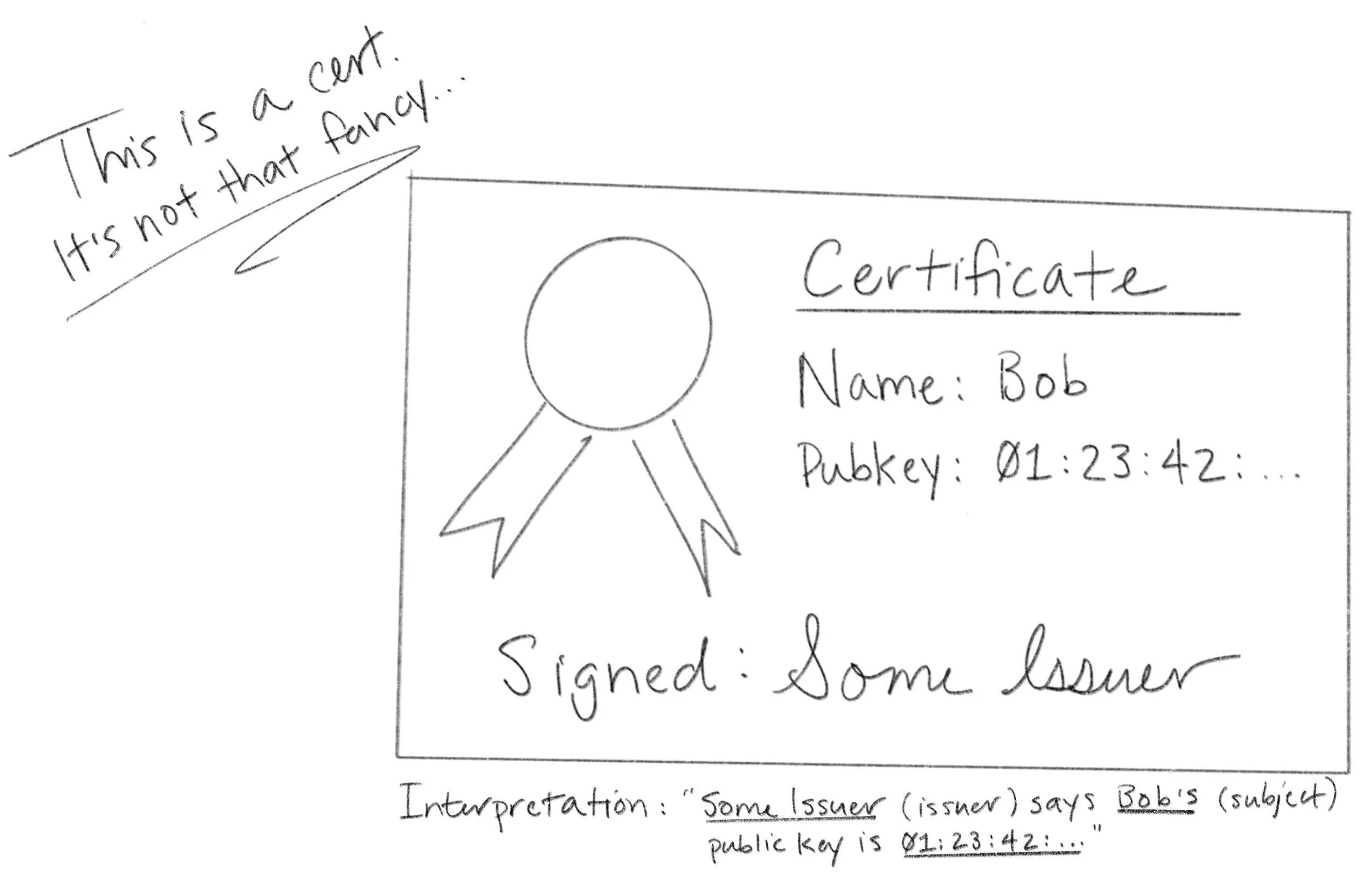
Certificates are fundamentally really simple. A certificate is a data structure that contains a public key and a name. The data structure is then signed. The signature binds the public key to the name. The entity that signs a certificate is called the issuer (or certificate authority) and the entity named in the certificate is called the subject.
证书本质上非常简单。证书是一种包含公钥和名称的数据结构。该数据结构会被签名。签名将公钥与名称绑定在一起。对证书进行签名的实体称为发行者(或证书机构),而证书中命名的实体称为主体。
If Some Issuer signs a certificate for Bob, that certificate can be interpreted as the statement: ” Some Issuer says Bob ‘s public key is 01:23:42…”.This is a claim made by Some Issuer about Bob. The claim is signed by Some Issuer, so if you know Some Issuer ‘s public key you can authenticate it by verifying the signature. If you trust Some Issuer you can trust the claim. Thus, certificates let you use trust, and knowledge of an issuer’s public key, to learn another entity’s public key (in this case, Bob ‘s). That’s it. Fundamentally, that’s all a certificate is.
如果某个发行者给 Bob 签发了一个证书,这个证书可以被理解为这样一个声明:“某个发行者说 Bob 的公钥是 01:23:42…”这是某个发行者对 Bob 做出的声明。该声明由某个发行者签名,因此如果你知道某个发行者的公钥,可以通过验证签名来认证它。如果你信任某个发行者,你就可以信任该声明。因此,证书让你能够利用信任和发行者的公钥知识,来获取另一个实体的公钥(在这个例子中是 Bob 的公钥)。就是这样。从根本上说,证书的全部就是这样。
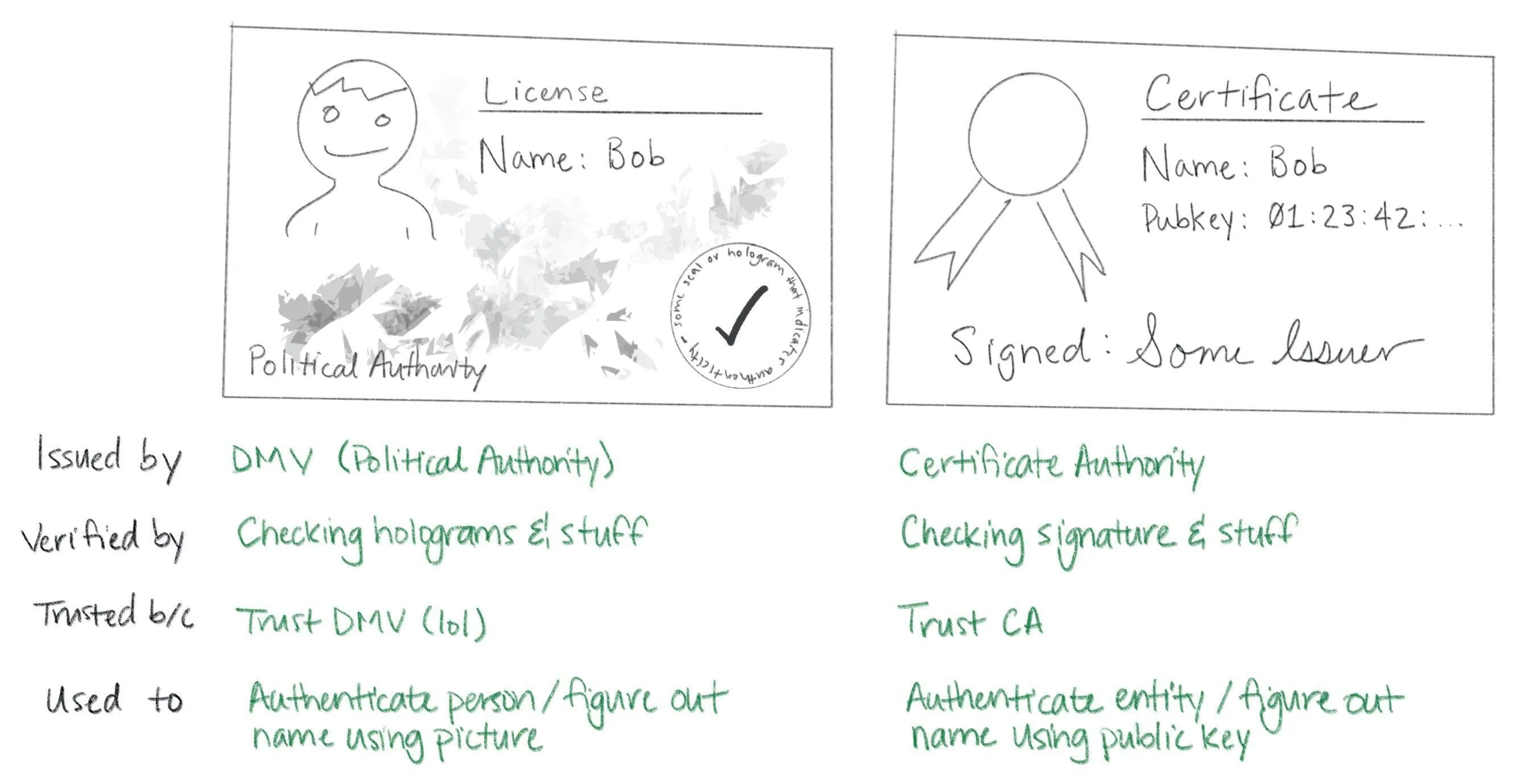
Certificates are like driver’s licenses or passports for computers and code. If you’ve never met me before, but you trust the DMV, you can use my license for authentication: verify that the license is valid (check hologram, etc), look at picture, look at me, read name. Computers use certificates to do the same thing: if you’ve never met some computer before, but you trust some certificate authority, you can use a certificate for authentication: verify that the certificate is valid (check signature, etc), look at public key, “look at private key” across network (as described above), read name.
证书就像计算机和代码的驾驶证或护照。如果你以前没见过我,但信任车管所,你就可以用我的驾驶证进行身份验证:验证驾驶证是否有效(检查防伪标识等),看照片,看我,读姓名。计算机使用证书做同样的事情:如果你以前没见过某台计算机,但信任某个证书颁发机构,你就可以用证书进行身份验证:验证证书是否有效(检查签名等),看公钥,通过网络“看”私钥(如上所述),读姓名。
Let’s take a quick look at a real certificate:
让我们快速看一下一个真实的证书:
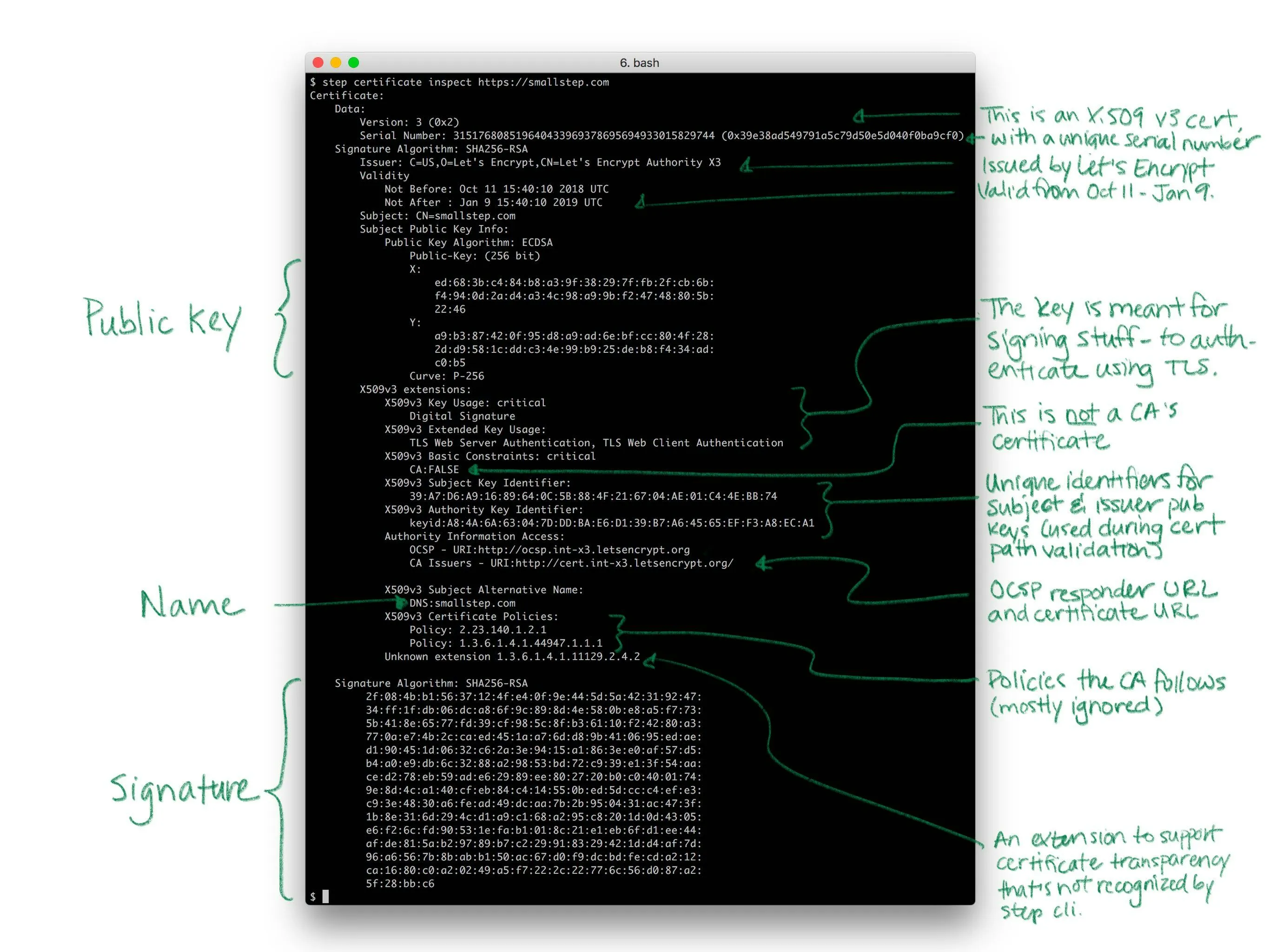
Yea so I might have simplified the story a little bit. Like a driver’s license, there’s other stuff in certificates. Licenses say whether you’re an organ donor and whether you’re authorized to drive a commercial vehicle. Certificates say whether you’re a CA and whether your public key is supposed to be used for signing or encryption. Both also have expirations.
是的,我可能把故事简化了一些。就像驾照一样,证书里还有其他信息。驾照会说明你是否是器官捐献者以及你是否被授权驾驶商用车辆。证书会说明你是否是 CA 以及你的公钥是否用于签名或加密。两者都有有效期。
There’s a bunch of detail here, but it doesn’t change what I said before: fundamentally, a certificate is just a thing that binds a public key to a name.
这里有很多细节,但这并不改变我之前所说的话:从根本上讲,证书只是一个将公钥与名称绑定的东西。
X.509, ASN.1, OIDs, DER, PEM, PKCS, oh my…
Let’s look at how certificates are represented as bits and bytes. This part actually is annoyingly complicated. In fact, I suspect that the esoteric and poorly defined manner in which certificates and keys are encoded is the source of most confusion and frustration around PKI in general. This stuff is dumb. Sorry.
让我们看看证书是如何以比特和字节的形式表示的。这部分实际上非常令人烦恼。事实上,我怀疑证书和密钥编码的神秘且定义不明确的方式是 PKI 普遍存在的大部分困惑和挫败感的根源。这些内容很愚蠢。抱歉。
Usually when people talk about certificates without additional qualification they’re referring to X.509 v3 certificates. More specifically, they’re usually talking about the PKIX variant described in RFC 5280 and further refined by the CA/Browser Forum’s Baseline Requirements. In other words, they’re referring to the sort of certificates that browsers understand and use for HTTPS (HTTP over TLS). There are other certificate formats. Notably, SSH and PGP both have their own. But we’re going to focus on X.509. If you can understand X.509 you’ll be able to figure everything else out.
通常情况下,当人们谈论证书而不做额外说明时,他们指的是 X.509 v3 证书。更具体地说,他们通常指的是 RFC 5280 中描述的 PKIX 变体,并由 CA/Browser 论坛的基线要求进一步细化。换句话说,他们指的是浏览器理解和用于 HTTPS(HTTP over TLS)的证书类型。还有其他证书格式。值得注意的是,SSH 和 PGP 都有自己的格式。但我们将专注于 X.509。如果你能理解 X.509,你就能弄清楚所有其他问题。
Since these certificates are so broadly supported — they have good libraries and whatnot — they’re frequently used in other contexts, too. They’re certainly the most common format for certificates issued by internal PKI (defined in a bit). Importantly, these certificates work out of the box with TLS and HTTPS clients and servers.
由于这些证书得到了广泛支持——它们拥有良好的库和诸如此类——因此它们也经常用于其他环境中。它们无疑是内部 PKI(稍后定义)签发的证书最常用的格式。重要的是,这些证书可以与 TLS 和 HTTPS 客户端及服务器无缝工作。
You can’t fully appreciate X.509 without a small history lesson. X.509 was first standardized in 1988 as part of the broader X.500 project under the auspices of the ITU-T (the International Telecommunications Union’s standards body). X.500 was an effort by the telcos to build a global telephone book. That never happened, but vestiges remain. If you’ve ever looked at an X.509 certificate and wondered why something designed for the web encodes a locality, state, and country here’s your answer: X.509 wasn’t designed for the web. It was designed thirty years ago to build a phone book.
要完全理解 X.509,需要了解一点历史。X.509 于 1988 年首次标准化,作为更广泛的 X.500 项目的一部分,该项目由国际电信联盟(ITU)的标准机构负责。X.500 是电信运营商试图建立一个全球电话簿的努力。这个计划最终没有实现,但留下了些许痕迹。如果你曾查看过 X.509 证书并好奇为什么为网络设计的证书在这里编码了地区、州和国家,答案就在这里:X.509 并不是为网络设计的。它是三十年前为建立电话簿而设计的。

X.509 builds on ASN.1, another ITU-T standard (defined by X.208 and X.680). ASN stands for Abstract Syntax Notation (1 stands for One). ASN.1 is a notation for defining data types. You can think of it like JSON for X.509 but it’s actually more like protobuf or thrift or SQL DDL. RFC 5280 uses ASN.1 to define an X.509 certificate as an object that contains various bits of information: a name, key, signature, etc.
X.509 基于 ASN.1,另一个 ITU-T 标准(由 X.208 和 X.680 定义)。ASN 代表抽象语法符号(1 代表 One)。ASN.1 是一种用于定义数据类型的符号。你可以把它想象成 X.509 的 JSON,但实际上它更像 protobuf 或 thrift 或 SQL DDL。RFC 5280 使用 ASN.1 将 X.509 证书定义为一个包含各种信息的对象:名称、密钥、签名等。
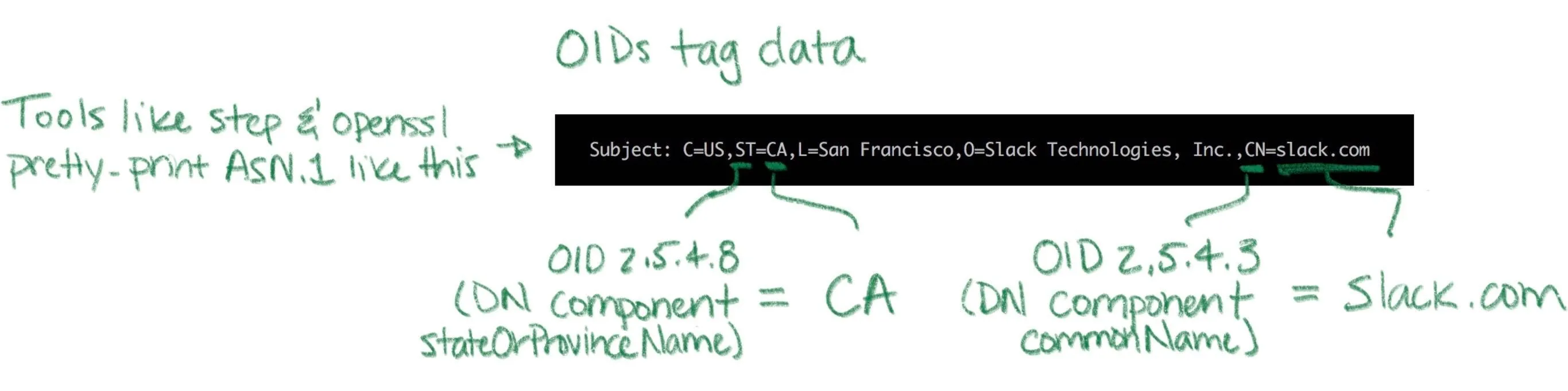
ASN.1 is abstract in the sense that the standard doesn’t say anything about how stuff should be represented as bits and bytes. For that there are various encoding rules that specify concrete representations for ASN.1 data values. It’s an additional abstraction layer that’s supposed to be useful, but is mostly just annoying. It’s sort of like the difference between unicode and utf8 (eek).
ASN.1 在抽象意义上是指标准并未说明数据应如何以比特和字节形式表示。为此,存在多种编码规则,它们为 ASN.1 数据值指定了具体的表示形式。这是一个额外的抽象层,本应很有用,但实际上大多令人烦恼。这有点像 Unicode 和 UTF-8 之间的区别(呃)。
There are a bunch of encoding rules for ASN.1, but there’s only one that’s commonly used for X.509 certificates and other crypto stuff: distinguished encoding rules or DER (though the non-canonical basic encoding rules (BER) are also occasionally used). DER is a pretty simple type-length-value encoding, but you really don’t need to worry about it since libraries will do most of the heavy lifting.
ASN.1 有很多编码规则,但用于 X.509 证书和其他加密内容时,通常只使用其中一种:区分编码规则或 DER(尽管非规范的基本编码规则(BER)偶尔也会用到)。DER 是一种相当简单的类型-长度-值编码,但你真的不需要担心它,因为库会完成大部分繁重的工作。
Unfortunately, the story doesn’t stop here. You don’t have to worry much about encoding and decoding DER but you definitely will need to figure out whether a particular certificate is a plain DER-encoded X.509 certificate or something fancier. There are two potential dimensions of fanciness: we might be looking at something more than raw DER, and we might be looking at something more than just a certificate.
可惜故事还没完。你不必太担心 DER 的编码和解码,但你确实需要弄清楚某个特定的证书是普通的 DER 编码 X.509 证书,还是更高级的东西。高级性有两个潜在维度:我们可能面对的不仅仅是原始 DER,也可能是超越证书本身的东西。
Starting with the former dimension, DER is straight binary, and binary data is hard to copy-paste and otherwise shunt around the web. So most certificates are packaged up in PEM files (which stands for Privacy Enhanced EMail, another weird historical vestige). If you’ve ever worked with MIME, PEM is similar: a base64 encoded payload sandwiched between a header and a footer. The PEM header has a label that’s supposed to describe the payload. Shockingly, this simple job is mostly botched and PEM labels are often inconsistent between tools (RFC 7468 attempts to standardize the use of PEM in this context, but it’s not complete and not always followed). Without further ado, here’s what a PEM-encoded X.509 v3 certificate looks like:
从第一个维度开始,DER 是纯二进制格式,而二进制数据难以复制粘贴并在网络上传输。因此,大多数证书都打包在 PEM 文件中(PEM 代表增强隐私的电子邮件,这是另一个奇怪的历史遗留问题)。如果你曾经接触过 MIME,PEM 与之类似:一个 base64 编码的有效载荷夹在头部和尾部之间。PEM 头部有一个标签,本应描述有效载荷的内容。令人震惊的是,这项简单的任务大多被搞砸了,不同工具之间的 PEM 标签往往不一致(RFC 7468 试图规范 PEM 在此环境下的使用,但它并不完整,且并非总是遵循)。废话不多说,以下是 PEM 编码的 X.509 v3 证书的样子:
-----BEGIN CERTIFICATE-----
MIIBwzCCAWqgAwIBAgIRAIi5QRl9kz1wb+SUP20gB1kwCgYIKoZIzj0EAwIwGzEZ
MBcGA1UEAxMQTDVkIFRlc3QgUm9vdCBDQTAeFw0xODExMDYyMjA0MDNaFw0yODEx
MDMyMjA0MDNaMCMxITAfBgNVBAMTGEw1ZCBUZXN0IEludGVybWVkaWF0ZSBDQTBZ
MBMGByqGSM49AgEGCCqGSM49AwEHA0IABAST8h+JftPkPocZyuZ5CVuPUk3vUtgo
cgRbkYk7Ong7ey/fM5fJdRNdeW6SouV5h3nF9JvYKEXuoymSNjGbKomjgYYwgYMw
DgYDVR0PAQH/BAQDAgGmMB0GA1UdJQQWMBQGCCsGAQUFBwMBBggrBgEFBQcDAjAS
BgNVHRMBAf8ECDAGAQH/AgEAMB0GA1UdDgQWBBRc+LHppFk8sflIpm/XKpbNMwx3
SDAfBgNVHSMEGDAWgBTirEpzC7/gexnnz7ozjWKd71lz5DAKBggqhkjOPQQDAgNH
ADBEAiAejDEfua7dud78lxWe9eYxYcM93mlUMFIzbWlOJzg+rgIgcdtU9wIKmn5q
FU3iOiRP5VyLNmrsQD3/ItjUN1f1ouY=
-----END CERTIFICATE-----
PEM-encoded certificates will usually carry a .pem, .crt, or .cer extension. A raw certificate encoded using DER will usually carry a .der extension. Again, there’s not much consistency here, so your mileage may vary.
PEM 编码的证书通常会携带 .pem 、 .crt 或 .cer 扩展。使用 DER 编码的原始证书通常会携带 .der 扩展。同样,这里没有太多一致性,所以结果可能会有所不同。
Returning to our other dimension of fanciness: in addition to fancier encoding using PEM, a certificate might be wrapped up in fancier packaging. Several envelope formats define larger data structures (still using ASN.1) that can contain certificates, keys, and other stuff. Some things ask for “a certificate” when they really want a certificate in one of these envelopes. So beware.
回到我们另一个关于花哨的维度:除了使用 PEM 进行更花哨的编码外,证书还可能被包裹在更花哨的包装中。几种信封格式定义了更大的数据结构(仍然使用 ASN.1),这些结构可以包含证书、密钥和其他内容。有些东西要求数据时,实际上可能需要这些信封中的一种。所以要注意。
The envelope formats you’re likely to encounter are part of a suite of standards called PKCS (Public Key Cryptography Standards) published by RSA labs (actually the story is slightly more complicated, but whatever). The first is PKCS#7, rebranded Cryptographic Message Syntax (CMS) by IETF, which can contain one or more certificates (encoding a full certificate chain, described shortly). PKCS#7 is commonly used by Java. Common extensions are .p7b and .p7c. The other common envelope format is PKCS#12 which can contain a certificate chain (like PKCS#7) along with an (encrypted) private key. PKCS#12 is commonly used by Microsoft products. Common extensions are .pfx and .p12. Again, the PKCS#7 and PKCS#12 envelopes also use ASN.1. That means both can be encoded as raw DER or BER or PEM. That said, in my experience they’re almost always raw DER.
你可能遇到的信封格式是 RSA 实验室发布的一套标准——PKCS(公钥密码学标准)的一部分(实际上故事稍微复杂一些,但不管怎样)。第一个是 PKCS#7,由 IETF 重新命名为加密消息语法(CMS),它可以包含一个或多个证书(编码一个完整的证书链,稍后描述)。PKCS#7 通常被 Java 使用。常见的扩展是 .p7b 和 .p7c 。另一个常见的信封格式是 PKCS#12,它可以包含一个证书链(如 PKCS#7)以及一个(加密的)私钥。PKCS#12 通常被微软产品使用。常见的扩展是 .pfx 和 .p12 。再次强调,PKCS#7 和 PKCS#12 信封也使用 ASN.1。这意味着两者都可以被编码为原始 DER 或 BER 或 PEM 格式。不过,根据我的经验,它们几乎总是以原始 DER 格式编码。
Key encoding is similarly convoluted, but the pattern is generally the same: some ASN.1 data structure describes the key, DER is used as a binary encoding, and PEM (hopefully with a useful header) might be used as a slightly friendlier representation. Deciphering the sort of key you’re looking at is half art, half science. If you’re lucky RFC 7468 will give good guidance to figure out what your PEM payload is. Elliptic curve keys are usually labeled as such, though there doesn’t seem to be any standardization. Other keys are simply “PRIVATE KEY” by PEM. This usually indicates a PKCS#8 payload, an envelope for private keys that includes key type and other metadata. Here’s an example of a PEM-encoded elliptic curve key:
密钥编码同样复杂,但模式通常相同:一些 ASN.1 数据结构描述密钥,DER 用作二进制编码,PEM(希望带有有用的标题)可能用作稍微友好的表示形式。解析你所查看的密钥类型,一半是艺术,一半是科学。如果你幸运的话,RFC 7468 会提供良好的指导来弄清楚你的 PEM 有效载荷是什么。椭圆曲线密钥通常被标记为该名称,尽管似乎没有标准化。其他密钥简单地通过 PEM 标记为”PRIVATE KEY”。这通常表示一个 PKCS#8 有效载荷,一个包含密钥类型和其他元数据的私钥信封。以下是一个 PEM 编码的椭圆曲线密钥的示例:
$ step crypto keypair --kty EC --no-password --insecure ec.pub ec.prv
$ cat ec.pub ec.prv
-----BEGIN PUBLIC KEY-----
MFkwEwYHKoZIzj0CAQYIKoZIzj0DAQcDQgAEc73/+JOESKlqWlhf0UzcRjEe7inF
uu2z1DWxr+2YRLfTaJOm9huerJCh71z5lugg+QVLZBedKGEff5jgTssXHg==
-----END PUBLIC KEY-----
-----BEGIN EC PRIVATE KEY-----
MHcCAQEEICjpa3i7ICHSIqZPZfkJpcRim/EAmUtMFGJg6QjkMqDMoAoGCCqGSM49
AwEHoUQDQgAEc73/+JOESKlqWlhf0UzcRjEe7inFuu2z1DWxr+2YRLfTaJOm9hue
rJCh71z5lugg+QVLZBedKGEff5jgTssXHg==
-----END EC PRIVATE KEY-----
It’s also quite common to see private keys encrypted using a password (a shared secret or symmetric key). Those will look something like this (Proc-Type and DEK-Info are part of PEM and indicate that this PEM payload is encrypted using AES-256-CBC):
也很常见看到使用密码(共享秘密或对称密钥)加密的私钥。它们看起来像这样( Proc-Type 和 DEK-Info 是 PEM 的一部分,表示这个 PEM 负载使用 AES-256-CBC 加密):
-----BEGIN EC PRIVATE KEY-----
Proc-Type: 4,ENCRYPTED
DEK-Info: AES-256-CBC,b3fd6578bf18d12a76c98bda947c4ac9

qdV5u+wrywkbO0Ai8VUuwZO1cqhwsNaDQwTiYUwohvot7Vw851rW/43poPhH07So
sdLFVCKPd9v6F9n2dkdWCeeFlI4hfx+EwzXLuaRWg6aoYOj7ucJdkofyRyd4pEt+
Mj60xqLkaRtphh9HWKgaHsdBki68LQbObLOz4c6SyxI=
-----END EC PRIVATE KEY-----
PKCS#8 objects can also be encrypted, in which case the header label should be “ENCRYPTED PRIVATE KEY” per RFC 7468. You won’t have Proc-Type and Dek-Info headers in this case as this information is encoded in the payload instead. Public keys will usually have a .pub or .pem extension. Private keys may carry a .prv, .key, or .pem extension. Once again, your mileage may vary.
PKCS#8 对象也可以被加密,此时头部标签应按照 RFC 7468 规定为”ENCRYPTED PRIVATE KEY”。在这种情况下,你不会看到 Proc-Type 和 Dek-Info 头部,因为相关信息已编码在负载中。公钥通常会有 .pub 或 .pem 扩展,私钥可能带有 .prv, .key 或 .pem 扩展。再次强调,具体情况可能会有所不同。
Quick summary. ASN.1 is used to define data types like certificates and keys. DER is a set of encoding rules for turning ASN.1 into bits and bytes. X.509 is defined in ASN.1. PKCS#7 and PKCS#12 are bigger data structures, also defined using ASN.1, that can contain certificates and other stuff. They’re commonly used by Java and Microsoft, respectively. Since raw binary DER is hard to shunt around the web most certificates are PEM-encoded, which base64 encodes the DER and labels it. Private keys are usually represented as PEM-encoded PKCS#8 objects. Sometimes they’re also encrypted with a password.
快速总结。ASN.1 用于定义数据类型,如证书和密钥。DER 是一套将 ASN.1 转换为比特和字节的编码规则。X.509 在 ASN.1 中定义。PKCS#7 和 PKCS#12 是更大的数据结构,也使用 ASN.1 定义,可以包含证书和其他内容。它们分别被 Java 和 Microsoft 广泛使用。由于原始二进制 DER 难以在网络上传输,大多数证书都是 PEM 编码的,即对 DER 进行 base64 编码并标记。私钥通常表示为 PEM 编码的 PKCS#8 对象。有时它们也会用密码加密。
If that’s confusing, it’s not you. It’s the world. I tried.
如果这让人困惑,那不是你的问题。是世界的问题。我试过了。
Public Key Infrastructure
公钥基础设施
It’s good to know what a certificate is, but that’s less than half the story. Let’s look at how certificates are created and used.
了解证书是什么是件好事,但这还不到故事的一半。让我们看看证书是如何创建和使用的。
Public key infrastructure (PKI) is the umbrella term for all of the stuff we need in order to issue, distribute, store, use, verify, revoke, and otherwise manage and interact with certificates and keys. It’s an intentionally vague term, like “database infrastructure”. Certificates are the building blocks of most PKIs, and certificate authorities are the foundation. That said, PKI is so much more. It includes libraries, cron jobs, protocols, conventions, clients, servers, people, processes, names, discovery mechanisms, and all the other stuff you’ll need to use public key cryptography effectively.
公钥基础设施(PKI)是一个涵盖了我们为发行、分发、存储、使用、验证、吊销以及以其他方式管理和交互证书和密钥所需的所有内容的总称。这是一个故意模糊的术语,就像“数据库基础设施”一样。证书是大多数 PKI 的基石,而证书颁发机构则是其基础。然而,PKI 远不止于此。它包括库、计划任务、协议、惯例、客户端、服务器、人员、流程、名称、发现机制以及使用公钥密码学时所需的全部其他内容。
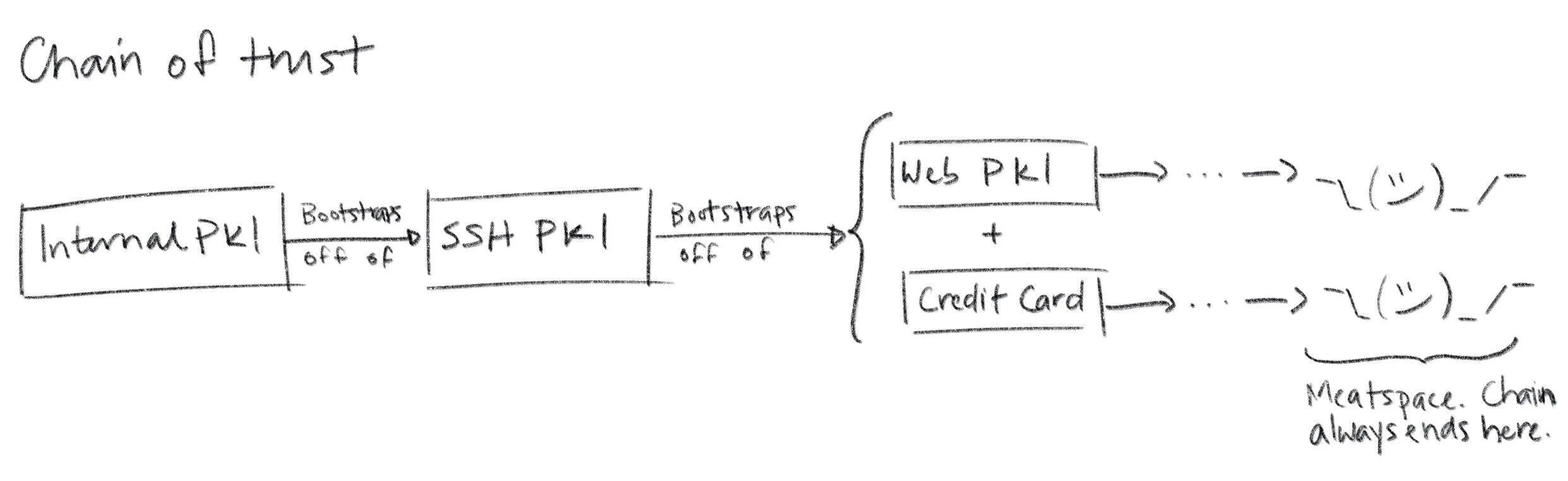
If you build your own PKI from scratch you’ll enjoy a ton of discretion. Just like if you build your own database infrastructure. In fact, many simple PKIs don’t even use certificates. When you edit ~/.ssh/authorized_keys you’re configuring a simple certificate-less form of PKI that SSH uses to bind public keys to names in flat files. PGP uses certificates, but doesn’t use CAs. Instead it uses a web-of-trust model. You can even use a blockchain to assign names and bind them to public keys. The only thing that’s truly mandatory if you’re building a PKI from scratch is that, definitionally, you’ve got to be using public keys. Everything else can change.
如果你从零开始构建自己的 PKI,将享有极大的自主权。就像如果你自己构建数据库基础设施一样。事实上,许多简单的 PKI 甚至不使用证书。当你编辑 ~/.ssh/authorized_keys 时,你正在配置一种简单的无证书 PKI 形式,SSH 使用它将公钥绑定到平面文件中的名称。PGP 使用证书,但不使用 CA。相反,它使用信任网络模型。你甚至可以使用区块链来分配名称并将它们绑定到公钥。如果你从零开始构建 PKI,唯一真正强制要求的是,从定义上讲,你必须使用公钥。其他所有内容都可以改变。
That said, you probably don’t want to build a PKI entirely from scratch. We’ll focus on the sort of PKI used on the web, and internal PKIs that are based on Web PKI technologies and leverage existing standards and components.
话说回来,你可能并不想完全从零开始构建一个 PKI。我们将重点关注网络中使用的 PKI 类型,以及基于 Web PKI 技术、利用现有标准和组件的内部门户 PKI。
As we proceed remember the simple goal of certificates and PKI: to bind names to public keys.
随着我们继续前进,请记住证书和 PKI 的简单目标:将名称与公钥绑定。
Web PKI vs Internal PKI
网络 PKI 与内部 PKI
You interact with Web PKI via your browser whenever you access an HTTPS URL — like when you loaded this website. This is the only PKI many people are (at least vaguely) familiar with. It creaks and clanks and bumbles along but it mostly works. Despite its problems, it substantially improves security on the web and it’s mostly transparent to users. You should use it everywhere your system communicates with the outside world over the internet.
你通过浏览器与网络 PKI 交互,每当你访问 HTTPS URL 时——就像你加载这个网站时一样。这是许多人(至少模糊地)熟悉的是唯一的 PKI。它吱吱作响、笨拙地运行,但基本上是有效的。尽管存在问题,但它显著提高了网络上的安全性,并且对用户来说基本上是透明的。你应该在系统通过互联网与外部世界通信的任何地方使用它。
Web PKI is mostly defined by RFC 5280 and refined by the CA/Browser Forum (a.k.a., CA/B or CAB Forum). It’s sometimes called “Internet PKI” or PKIX (after the working group that created it). The PKIX and CAB Forum documents cover a lot of ground. They define the variety of certificates we talked about in the last section. They also define what a “name” is and where it goes in a certificate, what signature algorithms can be used, how a relying party determines the issuer of a certificate, how a certificate’s validity period (issue and expiry dates) is specified, how revocation and certificate path validation works, the process that CAs use to determine whether someone owns a domain, and a whole lot more.
Web PKI 主要由 RFC 5280 定义,并由 CA/Browser 论坛(简称 CA/B 或 CAB Forum)进一步完善。它有时被称为“互联网 PKI”或 PKIX(以创建该工作组命名的缩写)。PKIX 和 CAB Forum 文档涵盖了广泛的内容。它们定义了我们上一节讨论的各种证书类型。它们还定义了证书中的“名称”是什么以及它放在哪里,可以使用哪些签名算法,依赖方如何确定证书的颁发者,如何指定证书的有效期(颁发和过期日期),如何进行撤销和证书路径验证,CA 如何确定某人是否拥有某个域名,以及更多内容。
Web PKI is important because Web PKI certificates work by default with browsers and pretty much everything else that uses TLS.
Web PKI 很重要,因为 Web PKI 证书默认与浏览器以及几乎所有使用 TLS 的其他事物兼容。
Internal PKI is PKI you run yourself, for your own stuff: production infrastructure like services, containers, and VMs; enterprise IT applications; corporate endpoints like laptops and phones; and any other code or device you want to identify. It allows you to authenticate and establish cryptographic channels so your stuff can run anywhere and securely communicate, even across the public internet.
内部 PKI 是指你自己运行的 PKI,用于管理自己的事务:生产基础设施如服务、容器和虚拟机;企业 IT 应用;企业终端如笔记本电脑和手机;以及任何你想要识别的代码或设备。它允许你进行身份验证并建立加密通道,使你的事务可以在任何地方安全运行,即使通过公共互联网也能安全通信。
Why run your own internal PKI if Web PKI already exists? The simple answer is that Web PKI wasn’t designed to support internal use cases. Even with a CA like Let’s Encrypt, which offers free certificates and automated provisioning, you’ll have to deal with rate limits and availability. That’s no good if you have lots of services that you deploy all the time.
为什么要在 Web PKI 已经存在的情况下运行自己的内部 PKI?简单的答案是 Web PKI 并非为内部使用场景而设计。即使使用像 Let’s Encrypt 这样的 CA(证书颁发机构),它提供免费的证书和自动化配置,你仍需应对速率限制和可用性问题。如果你有很多需要频繁部署的服务,这就不好了。
Further, with Web PKI you have little or no control over important details like certificate lifetime, revocation mechanisms, renewal processes, key types, and algorithms (all important stuff we’ll explain in a moment).
此外,使用 Web PKI 时,你几乎无法控制证书有效期、吊销机制、续期流程、密钥类型和算法等重要细节(这些我们稍后会详细解释)。
Finally, the CA/Browser Forum Baseline Requirements actually prohibit Web PKI CAs from binding internal IPs (e.g., stuff in 10.0.0.0/8) or internal DNS names that aren’t fully-qualified and resolvable in public global DNS (e.g., you can’t bind a kubernetes cluster DNS name like foo.ns.svc.cluster.local). If you want to bind this sort of name in a certificate, issue lots of certificates, or control certificate details, you’ll need your own internal PKI.
最后,《CA/Browser 论坛基线要求》实际上禁止 Web PKI CA 绑定内部 IP(例如, 10.0.0.0/8 中的内容)或未完全限定且无法在公共全球 DNS 中解析的内部 DNS 名称(例如,你不能绑定像 foo.ns.svc.cluster.local 这样的 kubernetes 集群 DNS 名称)。如果你想在证书中绑定这类名称、签发大量证书或控制证书细节,你需要自己的内部 PKI。
In the next section we’ll see that trust (or lack thereof) is yet another reason to avoid Web PKI for internal use. In short, use Web PKI for your public website and APIs. Use your own internal PKI for everything else.
在下一节中,我们将看到信任(或缺乏信任)是避免在内部使用 Web PKI 的另一个原因。简而言之,将 Web PKI 用于您的公共网站和 API。将您自己的内部 PKI 用于其他所有事情。
Trust & Trustworthiness
信任与可信度
Trust Stores
信任存储
Earlier we learned to interpret a certificate as a statement, or claim, like: ” issuer says subject’s public key is blah blah blah ”. This claim is signed by the issuer so it can be authenticated by relying parties. We glossed over something important in this description: “how does the relying party know the issuer ‘s public key?
之前我们学习了如何将证书解释为一个声明,或一个主张,例如:“发行者声称主题的公钥是如此如此”。这个主张由发行者签名,因此可以由依赖方进行验证。在这个描述中,我们忽略了一个重要的问题:“依赖方如何知道发行者的公钥?
So where do trust stores come from? For Web PKI the most important relying parties are web browsers. The trust stores used by default by the major browsers — and pretty much everything else that uses TLS — are maintained by four organizations:
那么信任存储来自哪里呢?对于 Web PKI 来说,最重要的受信任方是网络浏览器。主要浏览器默认使用的信任存储——以及几乎所有使用 TLS 的其他设备——都由四个组织维护:
- Apple’s root certificate program used by iOS and macOS
苹果用于 iOS 和 macOS 的根证书计划 - Microsoft’s root certificate program used by Windows
微软用于 Windows 的根证书计划 - Mozilla’s root certificate program used by their products and, because of its open and transparent process, used as the basis for many other trust stores (e.g., for many Linux distributions)
Mozilla 的根证书计划,被其产品使用,并且由于其开放和透明的流程,被许多其他信任存储(例如,许多 Linux 发行版)作为基础 - Google’s root certificate program used by Chrome on all platforms except iOS.
谷歌的根证书计划,在除 iOS 平台外的所有平台上被 Chrome 使用。 Operating system trust stores typically ship with the OS. Firefox ships with its own trust store (distributed using TLS from mozilla.org — bootstrapping off of Web PKI using some other trust store). Programming languages and other non-browser stuff likecurltypically use the OS trust store by default. So the trust stores typically used by default by pretty much everything come pre-installed and are updated via software updates (which are usually code signed using yet another PKI).
操作系统信任存储库通常随操作系统一同提供。Firefox 自带其信任存储库(通过从 mozilla.org 使用 TLS 分发——使用其他信任存储库从 Web PKI 进行初始化)。编程语言和其他非浏览器内容(如curl)默认情况下使用操作系统信任存储库。因此,几乎所有内容默认使用的信任存储库都是预装的,并通过软件更新进行更新(这些更新通常使用另一个 PKI 进行代码签名)。
There are more than 100 certificate authorities commonly included in the trust stores maintained by these programs. You probably know the big ones: Let’s Encrypt, Symantec, DigiCert, Entrust, etc. It can be interesting to peruse them. If you’d like to do so programmatically, Cloudflare’s cfssl project maintains a github repository that includes the trusted certificates from various trust stores to assist with certificate bundling (which we’ll discuss momentarily). For a more human-friendly experience you can query Censys to see which certificates are trusted by Mozilla, Apple, and Microsoft.
这些程序维护的信任库中通常包含超过 100 个证书颁发机构。你可能知道那些大的机构:Let’s Encrypt、Symantec、DigiCert、Entrust 等。浏览它们可能会很有趣。如果你想以编程方式这样做,Cloudflare 的 cfssl 项目维护了一个 GitHub 仓库,其中包含来自不同信任库的受信任证书,以协助证书捆绑(我们稍后会讨论)。为了获得更人性化的体验,你可以查询 Censys,查看 Mozilla、Apple 和 Microsoft 信任哪些证书。
Trustworthiness
可信度
These 100+ certificate authorities are trusted in the descriptive sense — browsers and other stuff trust certificates issued by these CAs by default. But that doesn’t mean they’re trustworthy in the moral sense. On the contrary, there are documented cases of Web PKI certificate authorities providing governments with fraudulent certificates in order to snoop on traffic and impersonate websites. Some of these “trusted” CAs operate out of authoritarian jurisdictions like China. Democracies don’t really have a moral high ground here, either. NSA takes every available opportunity to undermine Web PKI. In 2011 the “trusted” DigiNotar and Comodo certificate authorities were both compromised. The DigiNotar breach was probably NSA. There are also numerous examples of CAs mistakenly issuing malformed or non-compliant certificates. So while these CAs are de-facto trusted, as a group they’re empirically not trustworthy. We’ll soon see that Web PKI in general is only as secure as the least secure CA, so this is not good.
这 100 多家证书颁发机构在描述意义上被信任——浏览器和其他设备默认信任这些 CA 颁发的证书。但这并不意味着它们在道德意义上值得信赖。恰恰相反,有记录在案的 Web PKI 证书颁发机构曾向政府提供欺诈性证书,以便窃听流量和冒充网站。其中一些所谓的”可信”CA 在中国等威权司法管辖区运营。民主国家在这方面也没有道德制高点。NSA 利用一切机会破坏 Web PKI。2011 年,“可信”的 DigiNotar 和 Comodo 证书颁发机构均遭到入侵。DigiNotar 的安全漏洞很可能是由 NSA 造成的。还有大量 CA 错误颁发格式错误或不合规证书的案例。因此,虽然这些 CA 实际上被信任,但作为一个整体,它们在事实上不值得信赖。我们很快会看到,Web PKI 的整体安全性取决于最不安全的 CA,所以这并不理想。
The browser community has taken some action to address this issue. The CA/Browser Forum Baseline Requirements rationalize the rules that these trusted certificate authorities are supposed to follow before issuing certificates. CAs are audited for compliance with these rules as part of the WebTrust audit program, which is required by some root certificate programs for inclusion in their trust stores (e.g., Mozilla’s).
浏览器社区已经采取了一些措施来解决这个问题。CA/Browser 论坛基本要求合理化了这些受信任的证书颁发机构在签发证书前应该遵循的规则。CA 会根据这些规则进行合规性审计,这是某些根证书计划(例如 Mozilla 的)将其纳入信任存储所需的要求的一部分。
Still, if you’re using TLS for internal stuff, you probably don’t want to trust these public CAs any more than you have to. If you do, you’re probably opening up the door to NSA and others. You’re accepting the fact that your security depends on the discipline and scruples of 100+ other organizations. Maybe you don’t care, but fair warning.
然而,如果你使用 TLS 处理内部事务,你可能不想比现在更信任这些公共 CA。如果你这样做,你很可能为 NSA 和其他人敞开了大门。你接受了这样一个事实:你的安全依赖于 100 多家其他组织的纪律和诚信。也许你不在乎,但还是要提醒你。
Federation
联盟
To make matters worse, Web PKI relying parties (RPs) trust every CA in their trust store to sign certificates for any subscriber. The result is that the overall security of Web PKI is only as good as the least secure Web PKI CA. The 2011 DigiNotar attack demonstrated the problem here: as part of the attack a certificate was fraudulently issued for google.com. This certificate was trusted by major web browsers and operating systems despite the fact that Google had no relationship with DigiNotar. Dozens more fraudulent certificates were issued for companies like Yahoo!, Mozilla, and The Tor Project. DigiNotar root certificates were ultimately removed from the major trust stores, but a lot of damage had almost certainly already been done.
更糟糕的是,Web PKI 依赖方(RPs)信任其信任存储中的每一个 CA 为任何订阅者签名证书。其结果是,Web PKI 的整体安全性只取决于最不安全的 Web PKI CA。2011 年的 DigiNotar 攻击就证明了这个问题:作为攻击的一部分,一个伪造的证书被签发给 google.com。尽管谷歌与 DigiNotar 没有任何关系,但这个证书仍被主要的网络浏览器和操作系统所信任。此外,还有数十个伪造的证书被签发给雅虎、Mozilla 和 The Tor Project 等公司。最终,DigiNotar 根证书被移除出主要的信任存储,但几乎可以肯定的是,已经造成了巨大的损害。
More recently, Sennheiser got called out for installing a self-signed root certificate in trust stores with their HeadSetup app, then embedding the corresponding private key in the app’s configuration. Anyone can extract this private key and use it to issue a certificate for any domain. Any computer that has the Sennheiser certificate in its trust store would trust these fraudulent certificates. This completely undermines TLS. Oops.
最近,森海塞尔因在其 HeadSetup 应用中安装了一个自签名根证书,并将相应的私钥嵌入到应用的配置中而受到指责。任何人都可以提取这个私钥,并使用它为任何域名签发证书。任何包含森海塞尔证书在其信任存储中的计算机都会信任这些伪造的证书。这完全破坏了 TLS。哎呀。
There are a number of mitigation mechanisms that can help reduce these risks. Certificate Authority Authorization (CAA) allows you to restrict which CAs can issue certificates for your domain using a special DNS record. Certificate Transparency (CT) (RFC 6962) mandates that CAs submit every certificate they issue to an impartial observer that maintains a public certificate log to detect fraudulently issued certificates. Cryptographic proof of CT submission is included in issued certificates. HTTP Public Key Pinning (HPKP or just “pinning”) lets a subscriber (a website) tell an RP (a browser) to only accept certain public keys in certificates for a particular domain.
有多种缓解机制可以帮助降低这些风险。证书颁发机构授权(CAA)允许你使用特殊的 DNS 记录来限制哪些 CA 可以为你的域名颁发证书。证书透明度(CT)(RFC 6962)要求 CA 将它们颁发的每个证书提交给一个保持公共证书日志的不偏不倚的观察者,以检测欺诈性颁发的证书。CT 提交的加密证明包含在颁发的证书中。HTTP 公钥锁定(HPKP 或简称”锁定”)允许订阅者(网站)告诉 RP(浏览器)只接受特定域名的证书中的某些公钥。
The problem with all of these things is RP support, or lack thereof. The CAB Forum now mandates CAA checks in browsers. Some browsers also have some support for CT and HPKP. For other RPs (e.g., most TLS standard library implementations) this stuff is almost never enforced. This issue will come up repeatedly: a lot of certificate policy must be enforced by RPs, and RPs can rarely be bothered. If RPs don’t check CAA records and don’t require proof of CT submission this stuff doesn’t do much good.
所有这些问题的症结在于 RP 支持,或缺乏支持。CAB 论坛现在要求浏览器进行 CAA 检查。一些浏览器也支持 CT 和 HPKP。对于其他 RP(例如,大多数 TLS 标准库实现),这些机制几乎从不被强制执行。这个问题会反复出现:大量证书策略必须由 RP 强制执行,而 RP 很少会为此费心。如果 RP 不检查 CAA 记录也不要求 CT 提交证明,这些机制就没什么用处。
In any case, if you run your own internal PKI you should maintain a separate trust store for internal stuff. That is, instead of adding your root certificate(s) to the existing system trust store, configure internal TLS requests to use only your roots. If you want better federation internally (e.g., you want to restrict which certificates your internal CAs can issue) you might try CAA records and properly configured RPs. You might also want to check out SPIFFE, an evolving standardization effort that addresses this problem and a number of others related to internal PKI.
无论如何,如果你运行自己的内部 PKI,你应该为内部事务维护一个独立的信任存储库。也就是说,不要将你的根证书添加到现有的系统信任存储库中,而是配置内部 TLS 请求仅使用你的根证书。如果你希望内部联邦更好(例如,你希望限制你的内部 CA 可以签发的证书),你可以尝试 CAA 记录和正确配置的 RP。你也可以考虑 SPIFFE,这是一个正在发展的标准化工作,旨在解决内部 PKI 相关的问题以及其他一些问题。
What’s a Certificate Authority
什么是证书颁发机构
We’ve talked a lot about certificate authorities (CAs) but haven’t actually defined what one is. A CA is a trusted certificate issuer. It vouches for the binding between a public key and a name by signing a certificate. Fundamentally, a certificate authority is just another certificate and a corresponding private key that’s used to sign other certificates.
我们讨论了很多关于证书机构(CA),但实际上还没有定义什么是 CA。CA 是一个可信的证书发行者。它通过签署证书来证明公钥和名称之间的绑定。从根本上说,证书机构只是一个证书和相应的私钥的组合,用于签署其他证书。
Obviously some logic and process needs to be wrapped around these artifacts. The CA needs to get its certificate distributed in trust stores, accept and process certificate requests, and issue certificates to subscribers. A CA that exposes remotely accessible APIs to automate this stuff it’s called an online CA. A CA with a self-signed root certificate included in trust stores is called a root CA.
显然,这些实体需要被一些逻辑和流程所包围。CA 需要将其证书分发到信任存储中,接受和处理证书请求,并向订阅者颁发证书。一个通过远程可访问的 API 来自动化这些工作的 CA 被称为在线 CA。一个包含在信任存储中的自签名根证书的 CA 被称为根 CA。
Intermediates, Chains, and Bundling
中间证书、证书链和捆绑
The CAB Forum Baseline Requirements stipulate that a root private key belonging to a Web PKI root CA can only be used to sign a certificate by issuing a direct command (see section 4.3.1). In other words, Web PKI root CAs can’t automate certificate signing. They can’t be online. This is a problem for any large scale CA operation. You can’t have someone manually type a command into a machine to fulfill every certificate order.
CAB 论坛基本要求规定,属于 Web PKI 根 CA 的根私钥只能通过发出直接命令来签署证书(参见第 4.3.1 节)。换句话说,Web PKI 根 CA 不能自动化证书签署。它们不能在线。这对任何大规模的 CA 运营都是一个问题。你不能让某人手动在机器上输入命令来满足每一份证书订单。
The reason for this stipulation is security. Web PKI root certificates are broadly distributed in trust stores and hard to revoke. Compromising a root CA private key would affect literally billions of people and devices. Best practice, therefore, is to keep root private keys offline, ideally on some specialized hardware connected to an air gapped machine, with good physical security, and with strictly enforced procedures for use.
这项规定的理由是安全性。Web PKI 根证书广泛分布在信任存储中,难以撤销。如果根 CA 私钥被攻破,将影响数十亿的人和设备。因此,最佳实践是将根私钥离线保存,理想情况下保存在某些连接到隔离机的专用硬件上,该硬件具有良好的物理安全性和严格的使用程序。
Many internal PKIs also follow these same practices, though it’s far less necessary. If you can automate root certificate rotation (e.g., update your trust stores using configuration management or orchestration tools) you can easily rotate a compromised root key. People obsess so much over root private key management for internal PKIs that it delays or prevents internal PKI deployment. Your AWS root account credentials are at least as sensitive, if not more. How do you manage those credentials?
许多内部 PKI 也遵循这些相同做法,尽管远没有那么必要。如果你能自动化根证书轮换(例如,使用配置管理或编排工具更新你的信任存储库),你就可以轻松地轮换受损的根密钥。人们对于内部 PKI 的根私钥管理如此着迷,以至于它延误或阻止了内部 PKI 的部署。你的 AWS 根账户凭证至少和它一样敏感,甚至更敏感。你如何管理这些凭证?
To make certificate issuance scalable (i.e., to make automation possible) when the root CA isn’t online, the root private key is only used infrequently to sign a few intermediate certificates. The corresponding intermediate private keys are used by intermediate CAs (also called subordinate CAs) to sign and issue leaf certificates to subscribers. Intermediates aren’t generally included in trust stores, making them easier to revoke and rotate, so certificate issuance from an intermediate typically is online and automated.
为了在根 CA 不在线时使证书签发可扩展(即,使自动化成为可能),根私钥仅不频繁地用于签署少量中间证书。相应的中间私钥由中间 CA(也称为从属 CA)使用来签署并向订阅者签发叶证书。中间证书通常不包括在信任存储库中,这使得它们更容易被撤销和轮换,因此从中间证书签发通常是在线且自动化的。
This bundle of certificates — leaf, intermediate, root — forms a chain (called a certificate chain). The leaf is signed by the intermediate, the intermediate is signed by the root, and the root signs itself.
这一系列证书——叶证书、中间证书、根证书——构成一个链(称为证书链)。叶证书由中间证书签名,中间证书由根证书签名,根证书自我签名。
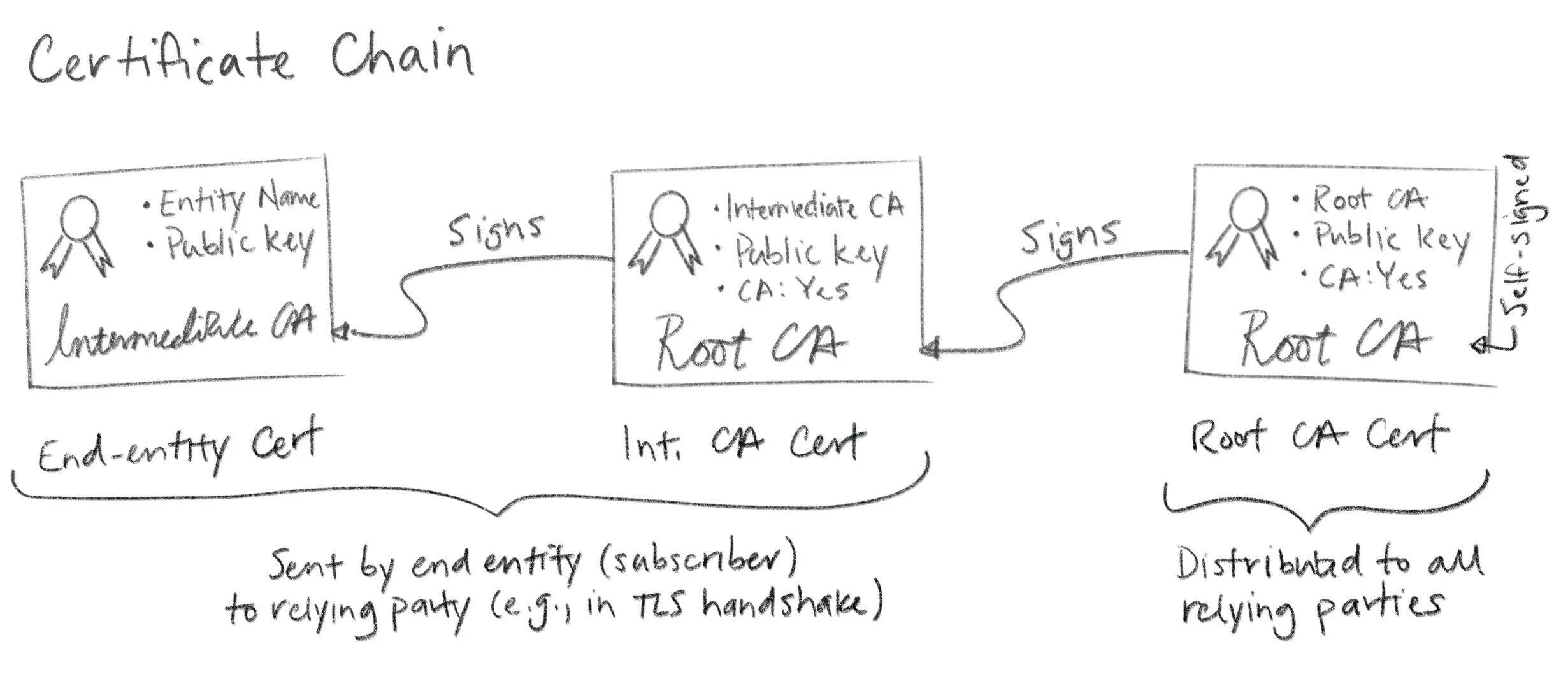
Technically this is another simplification. There’s nothing stopping you from creating longer chains and more complex graphs (e.g., by cross-certification). This is generally discouraged though, as it can become very complicated very quickly. In any case, end entity certificates are leaf nodes in this graph. Hence the name “leaf certificate”.
从技术上讲,这是一种简化。你完全可以创建更长的链和更复杂的图(例如,通过交叉认证)。不过通常不推荐这样做,因为它可能很快变得非常复杂。无论如何,终端实体证书是这个图中的叶节点。因此得名“叶证书”。
When you configure a subscriber (e.g., a web server like Apache or Nginx or Linkerd or Envoy) you’ll typically need to provide not just the leaf certificate, but a certificate bundle that includes intermediate(s). PKCS#7 and PKCS#12 are sometimes used here because they can include a full certificate chain. More often, certificate chains are encoded as a simple sequence of line-separated PEM objects. Some stuff expects the certs to be ordered from leaf to root, other stuff expects root to leaf, and some stuff doesn’t care. More annoying inconsistency. Google and Stack Overflow help here. Or trial and error.
当你配置一个订阅者(例如,Apache、Nginx、Linkerd 或 Envoy 等 Web 服务器)时,你通常不仅需要提供叶证书,还需要提供包含中间证书的证书包。PKCS#7 和 PKCS#12 有时会用于此目的,因为它们可以包含完整的证书链。更常见的是,证书链被编码为简单的、按行分隔的 PEM 对象序列。有些东西期望证书从叶到根排序,有些东西期望从根到叶排序,还有些东西不在乎。更令人烦恼的不一致性。这时可以求助 Google 和 Stack Overflow。或者尝试错误。
In any case, here’s an example:
无论如何,这里有一个示例:
$ cat server.crt
-----BEGIN CERTIFICATE-----
MIICFDCCAbmgAwIBAgIRANE187UXf5fn5TgXSq65CMQwCgYIKoZIzj0EAwIwHzEd
MBsGA1UEAxMUVGVzdCBJbnRlcm1lZGlhdGUgQ0EwHhcNMTgxMjA1MTc0OTQ0WhcN
MTgxMjA2MTc0OTQ0WjAUMRIwEAYDVQQDEwlsb2NhbGhvc3QwWTATBgcqhkjOPQIB
BggqhkjOPQMBBwNCAAQqE2VPZ+uS5q/XiZd6x6vZSKAYFM4xrYa/ANmXeZ/gh/n0
vhsmXIKNCg6vZh69FCbBMZdYEVOb7BRQIR8Q1qjGo4HgMIHdMA4GA1UdDwEB/wQE
AwIFoDAdBgNVHSUEFjAUBggrBgEFBQcDAQYIKwYBBQUHAwIwHQYDVR0OBBYEFHee
8N698LZWzJg6SQ9F6/gQBGkmMB8GA1UdIwQYMBaAFAZ0jCINuRtVd6ztucMf8Bun
D++sMBQGA1UdEQQNMAuCCWxvY2FsaG9zdDBWBgwrBgEEAYKkZMYoQAEERjBEAgEB
BBJtaWtlQHNtYWxsc3RlcC5jb20EK0lxOWItOEdEUWg1SmxZaUJwSTBBRW01eHN5
YzM0d0dNUkJWRXE4ck5pQzQwCgYIKoZIzj0EAwIDSQAwRgIhAPL4SgbHIbLwfRqO
HO3iTsozZsCuqA34HMaqXveiEie4AiEAhUjjb7vCGuPpTmn8HenA5hJplr+Ql8s1
d+SmYsT0jDU=
-----END CERTIFICATE-----
-----BEGIN CERTIFICATE-----
MIIBuzCCAWKgAwIBAgIRAKBv/7Xs6GPAK4Y8z4udSbswCgYIKoZIzj0EAwIwFzEV
MBMGA1UEAxMMVGVzdCBSb290IENBMB4XDTE4MTIwNTE3MzgzOFoXDTI4MTIwMjE3
MzgzOFowHzEdMBsGA1UEAxMUVGVzdCBJbnRlcm1lZGlhdGUgQ0EwWTATBgcqhkjO
PQIBBggqhkjOPQMBBwNCAAT8r2WCVhPGeh2J2EFdmdMQi5YhpMp3hyVZWu6XNDbn
xd8QBUNZTHqdsMKDtXoNfmhH//dwz78/kRnbka+acJQ9o4GGMIGDMA4GA1UdDwEB
/wQEAwIBpjAdBgNVHSUEFjAUBggrBgEFBQcDAQYIKwYBBQUHAwIwEgYDVR0TAQH/
BAgwBgEB/wIBADAdBgNVHQ4EFgQUBnSMIg25G1V3rO25wx/wG6cP76wwHwYDVR0j
BBgwFoAUcITNjk2XmInW+xfLJjMYVMG7fMswCgYIKoZIzj0EAwIDRwAwRAIgTCgI
BRvPAJZb+soYP0tnObqWdplmO+krWmHqCWtK8hcCIHS/es7GBEj3bmGMus+8n4Q1
x8YmK7ASLmSCffCTct9Y
-----END CERTIFICATE-----
Again, annoying and baroque, but not rocket science.
再次,既烦人又复杂,但并非高深莫测。
Certificate path validation
证书路径验证
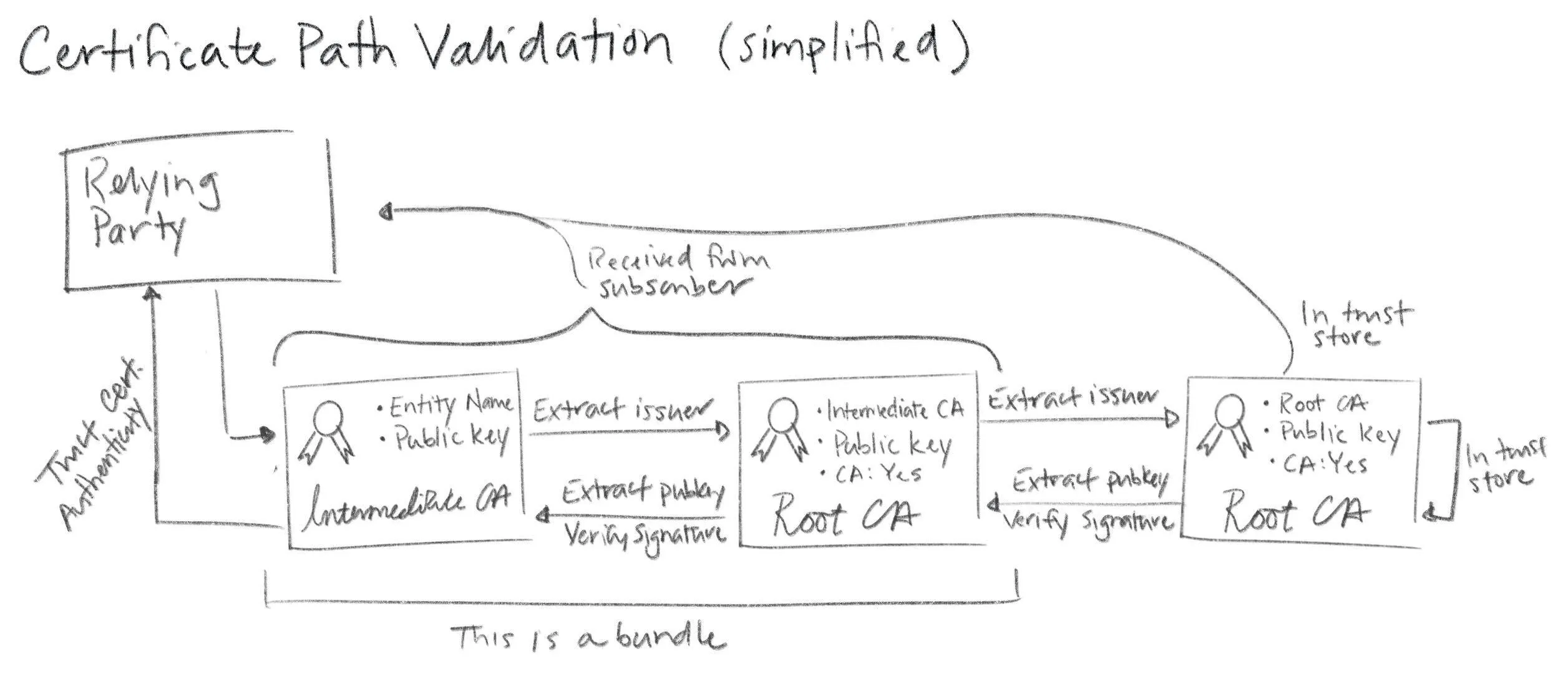
Since intermediate certificates are not included in trust stores they need to be distributed and verified just like leaf certificates. You provide these intermediates when you configure subscribers, as described above. Then subscribers pass them along to RPs. With TLS this happens as part of the handshake that establishes a TLS connection. When a subscriber sends its certificate to a relying party it includes any intermediate(s) necessary to chain back up to a trusted root. The relying party verifies the leaf and intermediate certificates in a process called certificate path validation.
由于中间证书不包含在信任存储中,它们需要像叶证书一样进行分发和验证。您在配置订阅者时提供这些中间证书,如上所述。然后订阅者将它们传递给 RP。在使用 TLS 时,这作为建立 TLS 连接的握手过程的一部分发生。当订阅者向依赖方发送其证书时,它会包含任何必要的中间证书,以便追溯到可信根。依赖方通过称为证书路径验证的过程来验证叶证书和中间证书。
Don’t disable certificate path validation. It’s not that hard to do proper TLS, and certificate path validation is the part of TLS that does authentication. People sometimes argue that the channel is still encrypted, so it doesn’t matter. That’s wrong. It does matter. Encryption without authentication is pretty worthless. It’s like a blind confessional: your conversation is private but you have no idea who’s on the other side of the curtain. Only this isn’t a church, it’s the internet. So don’t disable certificate path validation.
不要禁用证书路径验证。正确配置 TLS 并不难,而证书路径验证正是 TLS 进行身份验证的部分。有时人们会争论说信道仍然是加密的,所以这无关紧要。这是错误的。这确实有关系。没有身份验证的加密几乎毫无价值。这就像一个盲目的告解室:你的对话是私密的,但你不知道幕后的那个人是谁。但这里不是教堂,而是互联网。所以不要禁用证书路径验证。
Key & Certificate Lifecycle
密钥与证书生命周期
Before you can use a certificate with a protocol like TLS you need to figure out how to get one from a CA. Abstractly this is a pretty simple process: a subscriber that wants a certificate generates a key pair and submits a request to a certificate authority. The CA makes sure the name that will be bound in the certificate is correct and, if it is, signs and returns a certificate.
在使用证书与 TLS 等协议之前,你需要弄清楚如何从 CA 获取证书。抽象地说,这是一个相当简单的过程:想要证书的订阅者生成密钥对,并向证书机构提交请求。CA 确保证书中绑定的名称是正确的,如果是,就签名并返回证书。
Certificates expire, at which point they’re no longer trusted by RPs. If you’re still using a certificate that’s about to expire you’ll need to renew and rotate it. If you want RPs to stop trusting a certificate before it expires, it can (sometimes) be revoked.
证书会过期,过期后 RP 将不再信任该证书。如果你仍在使用即将过期的证书,你需要续期并轮换它。如果你希望 RP 在证书过期前停止信任它,可以(有时)进行吊销。
Like much of PKI this simple process is deceptively intricate. Hidden in the details are the two hardest problems in computer science: cache invalidation and naming things. Still, it’s all easy enough to reason about once you understand what’s going on.
像 PKI 的许多其他方面一样,这个看似简单的过程实际上错综复杂。细节中隐藏着计算机科学中最难的两个问题:缓存失效和命名。然而,一旦你理解了其中的原理,这一切都足够容易理解。
Naming things
命名
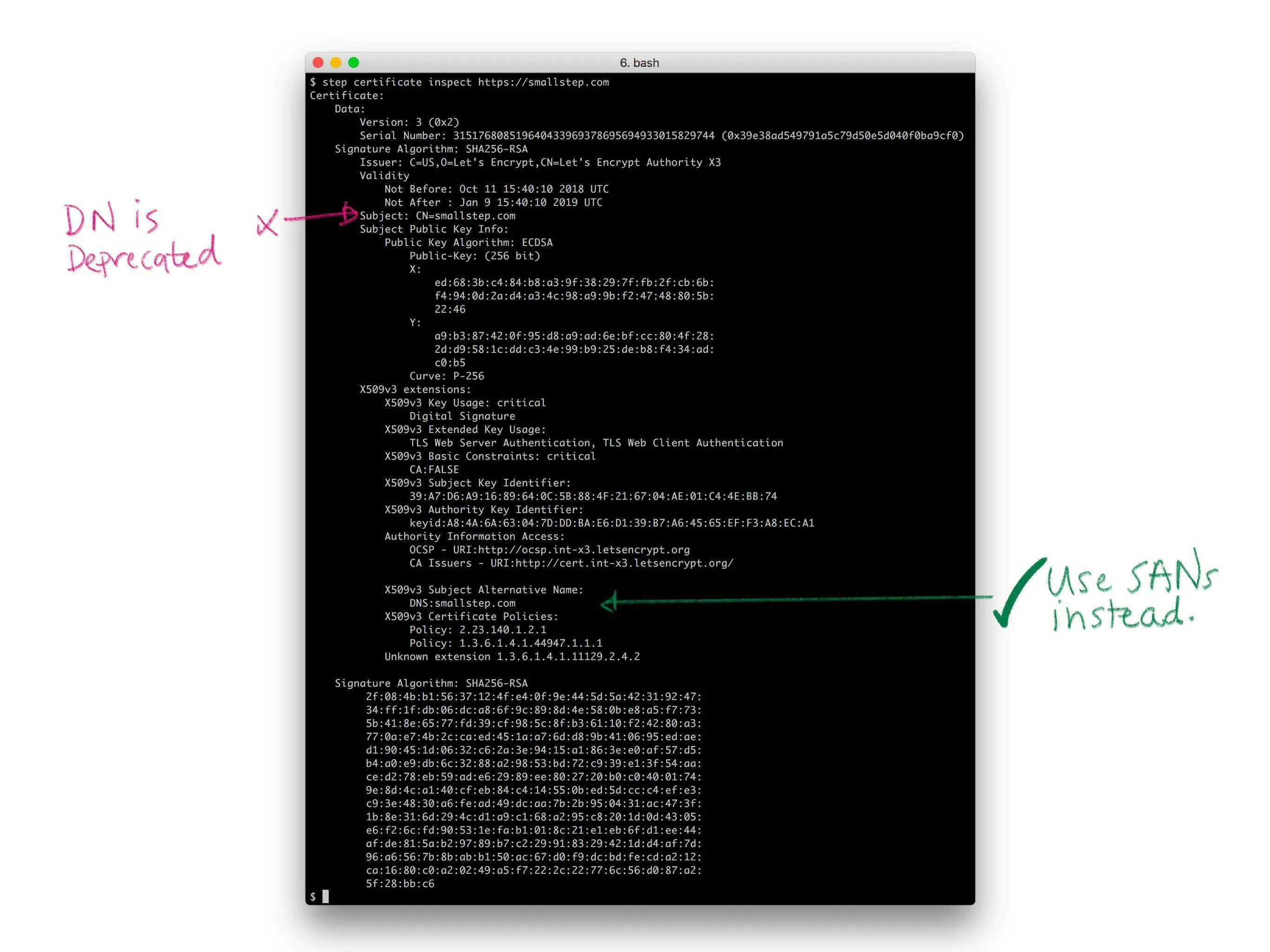
Historically, X.509 used X.500 distinguished names (DNs) to name the subject of a certificate (a subscriber). A DN includes a common name (for me, that’d be “Mike Malone”). It can also include a locality, country, organization, organizational unit, and a whole bunch of other irrelevant crap (recall that this stuff was originally meant for a digital phone book). No one understands distinguished names. They don’t really make sense for the web. Avoid them. If you do use them, keep them simple. You don’t have to use every field. In fact, you shouldn’t. A common name is probably all you need, and perhaps an organization name if you’re a thrill seeker.
历史上,X.509 使用 X.500 的区分名(DN)来命名证书的主题(订阅者)。一个 DN 包括一个通用名(对我来说,那就是”Mike Malone”)。它还可以包括一个地区、国家、组织、组织单位,以及一大堆其他无关紧要的废话(回想一下,这些信息最初是为数字电话簿设计的)。没有人真正理解区分名。它们对于网络来说并不真正有意义。避免使用它们。如果你确实要使用,保持它们简单。你不必使用所有字段。事实上,你不应该使用所有字段。一个通用名可能就足够了,如果你是个寻求刺激的人,或许还需要一个组织名。
PKIX originally specified that the DNS hostname of a website should be bound in the the DN common name. More recently, the CAB Forum has deprecated this practice and made the entire DN optional (see sections 7.1.4.2 of the Baseline Requirements). Instead, the modern best practices is to leverage the subject alternative name (SAN) X.509 extension to bind a name in a certificate.
PKIX 最初规定网站的 DNS 主机名应绑定在 DN 通用名中。最近,CAB 论坛已弃用这种做法,并将整个 DN 设为可选(参见《基线要求》第 7.1.4.2 节)。现代最佳实践是利用 X.509 扩展中的主题备用名称(SAN)来绑定证书中的名称。
There are four sorts of SANs in common use, all of which bind names that are broadly used and understood: domain names (DNS), email addresses, IP addresses, and URIs. These are already supposed to be unique in the contexts we’re interested in, and they map pretty well to the things we’re interested in identifying: email addresses for people, domain names and IP addresses for machines and code, URIs if you want to get fancy. Use SANs.
目前有四种常见的 SAN 类型,它们都绑定广泛使用和理解的名称:域名(DNS)、电子邮件地址、IP 地址和 URI。这些在我们所关注的上下文中本应具有唯一性,并且它们与我们所要识别的事物映射得相当好:为人们使用电子邮件地址,为机器和代码使用域名和 IP 地址,如果你想花哨一点,可以使用 URI。使用 SAN。
Generating key pairs
生成密钥对
Once we’ve got a name we need to generate a key pair before we can create a certificate. Recall that the security of a PKI depends critically on a simple invariant: that the only entity that knows a given private key is the subscriber named in the corresponding certificate. To be sure that this invariant holds, best practice is to have the subscriber generate its own key pair so it’s the only thing that ever knows it. Definitely avoid transmitting a private key across the network.
一旦我们有了名称,我们需要在创建证书之前生成密钥对。回想一下,PKI 的安全性严重依赖于一个简单的不变量:只有相应证书中列出的订阅者才知道某个特定的私钥。为了确保这个不变量成立,最佳实践是让订阅者自己生成密钥对,这样它就是唯一知道这个密钥的东西。绝对避免在网络上传输私钥。
You’ll need to decide what type of key you want to use. That’s another post entirely, but here’s some quick guidance (as of May 2023). There’s a slow but ongoing transition from RSA to elliptic curve keys (ECDSA or EdDSA). If you decide to use RSA keys make them at least 2048 bits, and don’t bother with anything bigger than 4096 bits. And use RSA-PSS, not RSA PKCS#1. If you use ECDSA, the P-256 curve is probably best (secp256k1 or prime256v1 in openssl)… unless you’re worried about the NSA in which case you may opt to use something fancier like EdDSA with Curve25519 (though support for these keys is not great). Here’s an example of generating a elliptic curve P-256 key pair using openssl:
你需要决定要使用哪种类型的密钥。这完全是另一篇文章的内容,但这里有一些快速指南(截至 2023 年 5 月)。目前正从 RSA 向椭圆曲线密钥(ECDSA 或 EdDSA)缓慢过渡。如果你决定使用 RSA 密钥,请确保它们至少为 2048 位,并且不要考虑超过 4096 位的东西。使用 RSA-PSS,而不是 RSA PKCS#1。如果你使用 ECDSA,P-256 曲线可能是最佳选择(在 openssl 中使用 secp256k1 或 prime256v1 )…除非你担心 NSA,那时你可以选择使用更高级的 EdDSA 与 Curve25519(尽管这些密钥的支持并不广泛)。以下是使用 openssl 生成椭圆曲线 P-256 密钥对的示例:
openssl ecparam -name prime256v1 -genkey -out k.prv
openssl ec -in k.prv -pubout -out k.pub
Here’s an example of generating the same sort of key pair using step:
以下是使用 step 生成相同类型密钥对的示例:
step crypto keypair --kty EC --curve P-256 k.pub k.prvYou can also do this programmatically, and never let your private keys touch disk.
你也可以以编程方式完成这件事,并且永远不要让你的私钥接触硬盘。
Choose your poison.选择你的方式。
Issuance
签发
Once a subscriber has a name and key pair the next step is to obtain a leaf certificate from a CA. The CA is going to want to authenticate (prove) two things:
一旦用户拥有名称和密钥对,下一步就是从 CA 获取一个叶证书。CA 需要验证(证明)两件事:
- The public key to be bound in the certificate is the subscriber’s public key (i.e., the subscriber knows the corresponding private key)
要绑定在证书中的公钥是用户的公钥(即,用户知道相应的私钥) - The name to be bound in the certificate is the subscriber’s name
要绑定在证书中的名称是用户的名称
The former is typically achieved via a simple technical mechanism: a certificate signing request. The latter is harder. Abstractly, the process is called identity proofing or registration.
前者通常通过一个简单的技术机制实现:证书签名请求。后者更难。抽象地说,这个过程称为身份验证或注册。
Certificate signing requests
证书签名请求
To request a certificate a subscriber submits a certificate signing request (CSR) to a certificate authority. The CSR is another ASN.1 structure, defined by PKCS#10.
要请求证书,订阅者向证书颁发机构提交一个证书签名请求(CSR)。CSR 是另一种 ASN.1 结构,由 PKCS#10 定义。
Like a certificate, a CSR is a data structure that contains a public key, a name, and a signature. It’s self-signed using the private key that corresponds to the public key in the CSR. This signature proves that whatever created the CSR knows the private key. It also allows the CSR to be copy-pasted and shunted around without the possibility of modification by some interloper.
与证书一样,CSR 是一个包含公钥、名称和签名的数据结构。它使用与 CSR 中公钥对应的私钥进行自签名。这个签名证明创建 CSR 的实体知道私钥。它还允许 CSR 被复制粘贴并在不同地方传递,而不会被某个闯入者修改。
CSRs include lots of options for specifying certificate details. In practice most of this stuff is ignored by CAs. Instead most CAs use a template or provide an administrative interface to collect this information.
CSRs 包含许多选项用于指定证书详情。实际上,CA 大多忽略这些信息。相反,大多数 CA 使用模板或提供管理界面来收集这些信息。
You can generate a key pair and create a CSR using step in one command like so:
你可以使用 step 在一个命令中生成密钥对并创建 CSR,如下所示:
step certificate create —csr test.smallstep.com test.csr test.key
OpenSSL is super powerful, but a lot more annoying.
OpenSSL 非常强大,但也很烦人。
Identity proofing
身份验证
Once a CA receives a CSR and verifies its signature the next thing it needs to do is figure out whether the name to be bound in the certificate is actually the correct name of the subscriber. This is tricky. The whole point of certificates is to allow RPs to authenticate subscribers, but how is the CA supposed to authenticate the subscriber before a certificate’s been issued?
一旦 CA 收到 CSR 并验证其签名,接下来需要做的是弄清楚证书中绑定的名称是否确实是订阅者的正确名称。这很棘手。证书的整个目的就是允许 RP 验证订阅者,但在证书签发之前,CA 该如何验证订阅者?
The answer is: it depends. For Web PKI there are three kinds of certificates and the biggest differences are how they identify subscribers and the sort of identity proofing that’s employed. They are: domain validation (DV), organization validation (OV), and extended validation (EV) certificates.
答案是:这取决于情况。对于 Web PKI,有三种类型的证书,它们之间最大的区别在于如何识别订阅者以及所采用的身份验证方式。它们分别是:域名验证(DV)、组织验证(OV)和扩展验证(EV)证书。
DV certificates bind a DNS name and are issued based on proof of control over a domain name. Proofing typically proceeds via a simple ceremony like sending a confirmation email to the administrative contact listed in WHOIS records. The ACME protocol, originally developed and used by Let’s Encrypt, improves this process with better automation: instead of using email verification an ACME CA issues a challenge that the subscriber must complete to prove it controls a domain. The challenge portion of the ACME specification is an extension point, but common challenges include serving a random number at a given URL (the HTTP challenge) and placing a random number in a DNS TXT record (the DNS challenge).
DV 证书将 DNS 名称绑定,并根据对域名控制的证明来签发。证明过程通常通过简单的仪式进行,例如向 WHOIS 记录中列出的管理联系人发送确认邮件。ACME 协议最初由 Let’s Encrypt 开发和使用,通过更好的自动化改进了这一过程:ACME CA 不再使用邮件验证,而是向用户发布一个挑战,用户必须完成该挑战以证明其对域名拥有控制权。ACME 规范中的挑战部分是一个扩展点,但常见的挑战包括在指定 URL 上提供随机数(HTTP 挑战)以及在 DNS TXT 记录中放置随机数(DNS 挑战)。
OV and EV certificates build on DV certificates and include the name and location of the organization that owns the bound domain name. They connect a certificate not just to a domain name, but to the legal entity that controls it. The verification process for OV certificates is not consistent across CAs. To address this, CAB Forum introduced EV certificates. They include the same basic information but mandate strict verification (identity proofing) requirements. The EV process can take days or weeks and can include public records searches and attestations (on paper) signed by corporate officers (with pens). And at the end of the day, web browsers don’t prominently differentiate EV certificates in any way. So, EV certificates aren’t widely leveraged by Web PKI relying parties.
OV 证书和 EV 证书建立在 DV 证书之上,并包含拥有绑定域名组织的名称和位置。它们将证书不仅与域名,而且与控制该域名的法律实体联系起来。OV 证书的验证过程在不同 CA 之间并不一致。为了解决这个问题,CAB Forum 引入了 EV 证书。它们包含相同的基本信息,但要求严格的验证(身份证明)要求。EV 流程可能需要几天或几周,可能包括公共记录查询和由公司高管(用笔)签署的纸质宣誓书。最终,网页浏览器以任何方式都没有突出显示 EV 证书。因此,EV 证书并没有被 Web PKI 依赖方广泛利用。
Essentially every Web PKI RP only requires DV level assurance, based on “proof” of control of a domain. It’s important to consider what, precisely, a DV certificate actually proves. It’s supposed to prove that the entity requesting the certificate owns the relevant domain. It actually proves that, at some point in time, the entity requesting the certificate was able to read an email or configure DNS or serve a secret via HTTP. The underlying security of DNS, email, and BGP that these processes rely on is not great. Attacks against this infrastructure have occurred with the intent to obtain fraudulent certificates.
基本上,每个 Web PKI RP 只需要 DV 级别的保证,基于对域名的“控制权证明”。重要的是要考虑 DV 证书实际上证明了什么。它本应证明申请证书的实体拥有相关域名。但实际上,它证明的是,在某个时间点上,申请证书的实体能够读取电子邮件、配置 DNS 或通过 HTTP 提供秘密信息。这些过程所依赖的 DNS、电子邮件和 BGP 的基础安全性并不理想。针对这些基础设施的攻击已经发生过,目的是获取欺诈性证书。
For internal PKI you can use any process you want for identity proofing. You can probably do better than relying on DNS or email the way Web PKI does. This might seem hard at first, but it’s really not. You can leverage existing trusted infrastructure: whatever you use to provision your stuff should also be able to measure and attest to the identity of whatever’s being provisioned. If you trust Chef or Puppet or Ansible or Kubernetes to put code on servers, you can trust them for identity attestations. If you’re using raw AMIs on AWS you can use instance identity documents (GCP and Azure have similar functionality).
对于内部 PKI,你可以使用任何你想要的身份验证流程。你很可能比 Web PKI 依赖 DNS 或电子邮件的方式做得更好。这最初可能看起来很困难,但实际上并不难。你可以利用现有的可信基础设施:你用来配置你的东西的工具也应该能够测量和证明正在配置的东西的身份。如果你信任 Chef、Puppet、Ansible 或 Kubernetes 将代码放到服务器上,你就可以信任它们进行身份证明。如果你在 AWS 上使用原始的 AMIs,你可以使用实例身份文件(GCP 和 Azure 有类似的功能)。
Your provisioning infrastructure must have some notion of identity in order to put the right code in the right place and start things up. And you must trust it. You can leverage this knowledge and trust to configure RP trust stores and bootstrap subscribers into your internal PKI. All you need to do is come up with some way for your provisioning infrastructure to tell your CA the identity of whatever’s starting up. Incidentally, this is precisely the gap step certificates was designed to fill.
你的配置基础设施必须对身份有一定的概念,以便将正确的代码放到正确的地方并启动服务。并且你必须信任它。你可以利用这种知识和信任来配置 RP 信任存储,并将订阅者引导到你的内部 PKI 中。你唯一需要做的是想出一种方法,让你的配置基础设施能够告诉你的 CA 正在启动的东西的身份。顺便说一句,这正是证书被设计来填补的空白步骤。
Expiration
有效期
Certificates expire… usually. This isn’t a strict requirement, per se, but it’s almost always true. Including an expiration in a certificate is important because certificate use is disaggregated: in general there’s no central authority that’s interrogated when a certificate is verified by an RP. Without an expiration date, certificates would be trusted forever. A rule of thumb for security is that, as we approach forever, the probability of a credential becoming compromised approaches 100%. Thus, certificates expire.
证书会过期……通常是这样。这并非严格的要求,但几乎总是如此。在证书中包含过期日期很重要,因为证书的使用是分散的:通常没有一个中央机构在 RP 验证证书时会进行查询。如果没有过期日期,证书将被永久信任。安全的一个经验法则是,随着我们接近永恒,凭证被攻破的概率将接近 100%。因此,证书会过期。
In particular, X.509 certificates include a validity period: an issued at time, a not before time, and a not after time. Time marches forward, eventually passes the not after time, and the certificate dies. This seemingly innocuous inevitability has a couple important subtleties.
特别是,X.509 证书包含一个有效期:一个签发时间、一个生效时间和一个失效时间。时间向前推进,最终会超过失效时间,然后证书就失效了。这种看似无害的必然性有几个重要的细节。
First, there’s nothing stopping a particular RP from accepting an expired certificate by mistake (or bad design). Again, certificate use is disaggregated. It’s up to each RP to check whether a certificate has expired, and sometimes they mess up. This might happen if your code depends on a system clock that isn’t properly synchronized. A common scenario is a system whose clock is reset to the unix epoch that doesn’t trust any certificates because it thinks it’s January 1, 1970 — well before the not before time on any recently issued certificate. So make sure your clocks are synchronized!
首先,没有任何东西能阻止某个 RP( relying party,依赖方)错误地接受一个过期的证书(或因设计不良)。再次强调,证书的使用是分散的。每个 RP 都需要检查证书是否过期,有时他们会出错。这种情况可能发生在你的代码依赖于一个没有正确同步的系统时钟时。一个常见的情况是,系统时钟被重置为 UNIX 纪元(1970 年 1 月 1 日),因为它不信任任何证书,因为它认为现在是 1970 年 1 月 1 日——这远早于任何最近签发的证书的”not before”时间。所以请确保你的时钟是同步的!
On the subscriber side, private key material needs to be dealt with properly after certificate expiration. If a key pair was used for signing/authentication (e.g., with TLS) you’ll want to delete the private key once it’s no longer needed. Keeping a signing key around is an unnecessary security risk: it’s no good for anything but fraudulent signatures. However, if your key pair was used for encryption the situation is different. You’ll need to keep the private key around as long as there’s still data encrypted under the key. If you’ve ever been told not to use the same key pair for signing and encryption, this is the main reason. Using the same key for signing and encryption makes it impossible to implement key lifecycle management best practices when a private key is no longer needed for signing: it forces you to keep signing keys around longer than necessary if it’s still needed to decrypt stuff.
在用户端,证书过期后需要妥善处理私钥材料。如果密钥对用于签名/认证(例如,使用 TLS),一旦不再需要,就应删除私钥。保留签名密钥会带来不必要的 security 风险:它除了用于欺诈签名外没有任何用处。然而,如果您的密钥对用于加密,情况就不同了。只要还有数据被该密钥加密,就需要保留私钥。如果您曾经被告知不要使用相同的密钥对进行签名和加密,这主要是因为这一点。使用相同的密钥进行签名和加密,当私钥不再需要用于签名时,使得无法实施密钥生命周期管理的最佳实践:如果它仍然需要用于解密数据,这会迫使您保留签名密钥的时间比必要的时间更长。
Renewal
续期
If you’re still using a certificate that’s about to expire you’re going to want to renew it before that happens. There’s actually no standard renewal process for Web PKI — there’s no formal way to extend the validity period on a certificate. Instead you just replace the expiring certificate with a new one. So the renewal process is the same as the issuance process: generate and submit a CSR and fulfill any identity proofing obligations.
如果你还在使用即将到期的证书,你需要在它过期之前进行续期。实际上,Web PKI 没有标准的续期流程——没有正式的方法来延长证书的有效期。相反,你只需用一个新的证书替换即将到期的证书。因此,续期流程与发行流程相同:生成并提交一个 CSR,并履行任何身份验证义务。
For internal PKI we can do better. The easiest thing to do is to use your old certificate with a protocol like mutual TLS to renew. The CA can authenticate the client certificate presented by the subscriber, re-sign it with an extended expiry, and return the new certificate in response. This makes automated renewal very easy and still forces subscribers to periodically check in with a central authority. You can use this checkin process to easily build monitoring and revocation facilities.
对于内部 PKI,我们可以做得更好。最简单的方法是使用旧的证书与 mutual TLS 等协议进行续期。CA 可以验证订阅者提交的客户证书,用延长后的有效期重新签名,并返回新的证书作为响应。这使得自动续期变得非常简单,同时仍然强制订阅者定期与中央权威进行验证。你可以利用这个验证过程轻松构建监控和吊销设施。
In either case the hardest part is simply remembering to renew your certificates before they expire. Pretty much everyone who manages certificates for a public website has had one expire unexpectedly, producing an error like this. My best advice here is: if something hurts, do it more. Use short lived certificates. That will force you to improve your processes and automate this problem away. Let’s Encrypt makes automation easy and issues 90 day certificates, which is pretty good for Web PKI. For internal PKI you should probably go even shorter: twenty-four hours or less. There are some implementation challenges — hitless certificate rotation can be a bit tricky — but it’s worth the effort.
在任何情况下,最困难的部分仅仅是记住在证书过期前进行续期。几乎每个管理公共网站证书的人都遇到过意外过期的情况,导致出现类似这样的错误。在此我最好的建议是:如果某事令人痛苦,就多做它。使用短期证书。这将迫使你改进流程并自动化这个问题。Let’s Encrypt 使自动化变得简单,并签发 90 天的证书,这对 Web PKI 来说相当不错。对于内部 PKI,你可能应该更短:24 小时或更短。有一些实施挑战——无感知证书轮换可能有点棘手——但它值得努力。
Quick tip, you can use step to check the expiry time on a certificate from the command line:
快速提示,你可以使用 step 在命令行上检查证书的过期时间:
step certificate inspect cert.pem --format json | jq .validity.end
step certificate inspect https://smallstep.com --format json | jq .validity.end
It’s a little thing, but if you combine this with a DNS zone transfer in a little bash script you can get decent monitoring around certificate expiration for all your domains to help catch issues before they become outages.
这是一个小细节,但如果你将其与一个包含 DNS 区域传输的小 bash 脚本结合起来,你可以在所有域名周围获得不错的证书过期监控,以帮助在问题变成停机之前发现它们。
Revocation
吊销
If a private key is compromised or a certificate’s simply no longer needed you might want to revoke it. That is, you might want to actively mark it as invalid so that it stops being trusted by RPs immediately, even before it expires. Revoking X.509 certificates is a big mess. Like expiration, the onus is on RPs to enforce revocations. Unlike expiration, the revocation status can’t be encoded in the certificate. The RP has to determine the certificate’s revocation status via some out-of-band process. Unless explicitly configured, most Web PKI TLS RPs don’t bother, as several documented cases have shown: 1 2 PKI 3 4 5.
如果私钥被攻破或证书不再需要,你可能想要吊销它。也就是说,你可能想要主动将其标记为无效,以便它在过期之前立即停止被 RP 信任。吊销 X.509 证书是一团糟。与过期一样,责任在于 RP 来执行吊销。与过期不同,吊销状态不能编码在证书中。RP 必须通过某种带外流程来确定证书的吊销状态。除非明确配置,大多数 Web PKI TLS RP 不会费心,正如几个已记录的案例所示:1 2 PKI 3 4 5。
In other words, by default, most TLS implementations will happily accept revoked certificates.
换句话说,默认情况下,大多数 TLS 实现会欣然接受被吊销的证书。
For internal PKI the trend is towards accepting this reality and using passive revocation. That is, issuing certificates that expire quickly enough that revocation isn’t necessary. If you want to “revoke” a certificate you simply disallow renewal and wait for it to expire. For this to work you need to use short-lived certificates. How short? That depends on your threat model (that’s how security professionals say ¯\ (ツ) /¯). Twenty-four hours is pretty typical, but so are much shorter expirations like five minutes. There are obvious challenges around scalability and availability if you push lifetimes too short: every renewal requires interaction with an online CA, so your CA infrastructure better be scalable and highly available. As you decrease certificate lifetime, remember to keep all your clocks in sync or you’re gonna have a bad time.
对于内部 PKI,趋势是接受这一现实并使用被动吊销。也就是说,签发有效期足够短的证书,以至于无需吊销。如果你想”吊销”一个证书,只需禁止续期并等待其过期即可。要使这种方式有效,你需要使用短期证书。多短?这取决于你的威胁模型(这是安全专业人员如何表达¯\(ツ)/¯的方式)。24 小时很典型,但 5 分钟等更短的期限也很常见。如果你将有效期推得太短,就会面临明显的可扩展性和可用性挑战:每次续期都需要与在线 CA 交互,因此你的 CA 基础设施必须具有可扩展性和高可用性。当你减少证书有效期时,请记得保持所有时钟同步,否则你会遇到糟糕的情况。
For the web and other scenarios where passive revocation won’t work, the first thing you should do is stop and reconsider passive revocation. If you really must have revocation you have two options:
对于网络和其他被动吊销无法生效的场景,你应该做的第一件事是停止并重新考虑被动吊销。如果你确实需要吊销,你有两个选择:
- Certificate Revocation Lists (CRLs)
证书吊销列表(CRL) - Online Certificate Signing Protocol (OCSP)
在线证书签名协议(OCSP)
CRLs are defined along with a million other things in RFC 5280. They’re simply a signed list of serial numbers identifying revoked certificates. The list is served from a CRL distribution point: a URL that’s included in the certificate. The expectation is that relying parties will download this list and interrogate it for revocation status whenever they verify a certificate. There are some obvious problems here: CRLs can be big, and distribution points can go down. If RPs check CRLs at all they’ll heavily cache the response from the distribution point and only sync periodically. On the web CRLs are often cached for days. If it’s going to take that long for CRLs to propagate you might as well just use passive revocation. It’s also common for RPs to fail open — to accept a certificate if the the CRL distribution point is down. This can be a security issue: you can trick an RP into accepting a revoked certificate by mounting a denial of service attack against the CRL distribution point.
CRLs 在 RFC 5280 中与其他一百万项内容一同被定义。它们本质上是一份包含序列号的已签名列表,用于标识被吊销的证书。该列表从 CRL 分发点提供:这是一个包含在证书中的 URL。预期的是,在验证证书时,依赖方会下载此列表并查询其吊销状态。这里存在一些明显的问题:CRL 可能很大,分发点也可能失效。如果依赖方检查 CRL,他们会大量缓存分发点的响应,并定期同步。在网络上,CRL 通常会缓存数天。如果 CRL 的传播需要这么长时间,那么直接使用被动吊销可能更合适。此外,依赖方通常采用“开放失败”策略——如果 CRL 分发点失效,则接受证书。这可能是一个安全问题:你可以通过对 CRL 分发点发起拒绝服务攻击,诱使依赖方接受被吊销的证书。
For what it’s worth, even if you’re using CRLs you should consider using short-lived certificates to keep CRL size down. The CRL only needs to include serial numbers for certificates that are revoked and haven’t yet expired. If your certs have shorter lifetimes, your CRLs will be shorter.
说实话,即使你使用 CRL,也应该考虑使用短期证书来控制 CRL 的大小。CRL 只需要包含已吊销但尚未过期的证书的序列号。如果你的证书有效期较短,你的 CRL 也会更短。
If you don’t like CRL your other option is OCSP, which allows RPs to query an OCSP responder with a certificate serial number to obtain the revocation status of a particular certificate. Like the CRL distribution point, the OCSP responder URL is included in the certificate. OCSP sounds sweet (and obvious), but it has its own problems. It raises serious privacy issues for Web PKI: the OCSP responder can see what sites I’m visiting based on the certificate status checks I’ve submitted. It also adds overhead to every TLS connection: an additional request has to be made to check revocation status. Like CRL, many RPs (including browsers) fail open and assume a certificate is valid if the OCSP responder is down or returns an error.
如果你不喜欢 CRL,你的另一个选择是 OCSP,它允许 RP(注册机构)使用证书序列号向 OCSP 响应器查询特定证书的吊销状态。与 CRL 分发点一样,OCSP 响应器 URL 也包含在证书中。OCSP 听起来很棒(也很明显),但它也有自己的问题。它给 Web PKI 带来了严重的隐私问题:OCSP 响应器可以根据我提交的证书状态检查来看到我访问的网站。它还增加了每个 TLS 连接的开销:需要额外发起请求来检查吊销状态。与 CRL 一样,许多 RP(包括浏览器)会默认开启,如果 OCSP 响应器宕机或返回错误,就假设证书是有效的。
OCSP stapling is a variant of OCSP that’s supposed to fix these issues. Instead of the relying party hitting the OCSP responder the subscriber that owns the certificate does. The OCSP response is a signed attestation with a short expiry stating that the certificate is not revoked. The attestation is included in the TLS handshake (“stapled to” the certificate) between subscriber and RP. This provides the RP with a reasonably up-to-date revocation status without having to query the OCSP responder directly. The subscriber can use a signed OCSP response multiple times, until it expires. This reduces the load on the responder, mostly eliminates performance problems, and addresses the privacy issue with OCSP. However, all of this is a bit of a rube goldberg device. If subscribers are hitting some authority to obtain a short-lived signed attestation saying that a certificate hasn’t expired why not cut out the middleman: just use short-lived certificates.
OCSP 缓存是 OCSP 的一种变体,旨在解决这些问题。不再由依赖方去访问 OCSP 响应器,而是由拥有证书的订阅者去访问。OCSP 响应是一个带有短期有效期的签名证明,声明该证书未被吊销。该证明包含在订阅者和依赖方之间的 TLS 握手过程中(“附加”到证书上)。这为依赖方提供了相对较新的吊销状态,而无需直接查询 OCSP 响应器。订阅者可以使用一个签名的 OCSP 响应多次,直到它过期。这减轻了响应器的负载,基本消除了性能问题,并解决了 OCSP 的隐私问题。然而,所有这一切都有些像鲁本金钟装置。如果订阅者需要向某个权威机构获取一个短期的签名证明,声明证书未过期,为什么不省去中间人:直接使用短期证书。
Using certificates
使用证书
With all of this background out of the way, actually using certificates is really easy. We’ll demonstrate with TLS, but most other uses are pretty similar.
在所有这些背景信息之外,实际上使用证书非常简单。我们将以 TLS 为例进行演示,但大多数其他用途也相当类似。
- To configure a PKI relying party you tell it which root certificates to use
要配置 PKI 依赖方,你需要告诉它使用哪些根证书 - To configure a PKI subscriber you tell it which certificate and private key to use (or tell it how to generate its own key pair and exchange a CSR for a certificate itself)
要配置 PKI 订阅方,你需要告诉它使用哪个证书和私钥(或者告诉它如何生成自己的密钥对,并为证书交换 CSR)
It’s pretty common for one entity (code, device, server, etc) to be both an RP and a subscriber. Such entities will need to be configured with the root certificate(s) and a certificate and private key. Finally, for Web PKI the right root certificates are generally trusted by default, so you can skip that part.
通常一个实体(代码、设备、服务器等)会同时充当依赖方和订阅方。这样的实体需要配置根证书和证书及私钥。最后,对于 Web PKI,正确的根证书通常默认受信任,所以你可以跳过这一步。
Here’s a complete example demonstrating certificate issuance, root certificate distribution, and TLS client (RP) and server (subscriber) configuration:
这是一个完整的示例,展示了证书签发、根证书分发以及 TLS 客户端(RP)和服务器(订阅者)的配置:
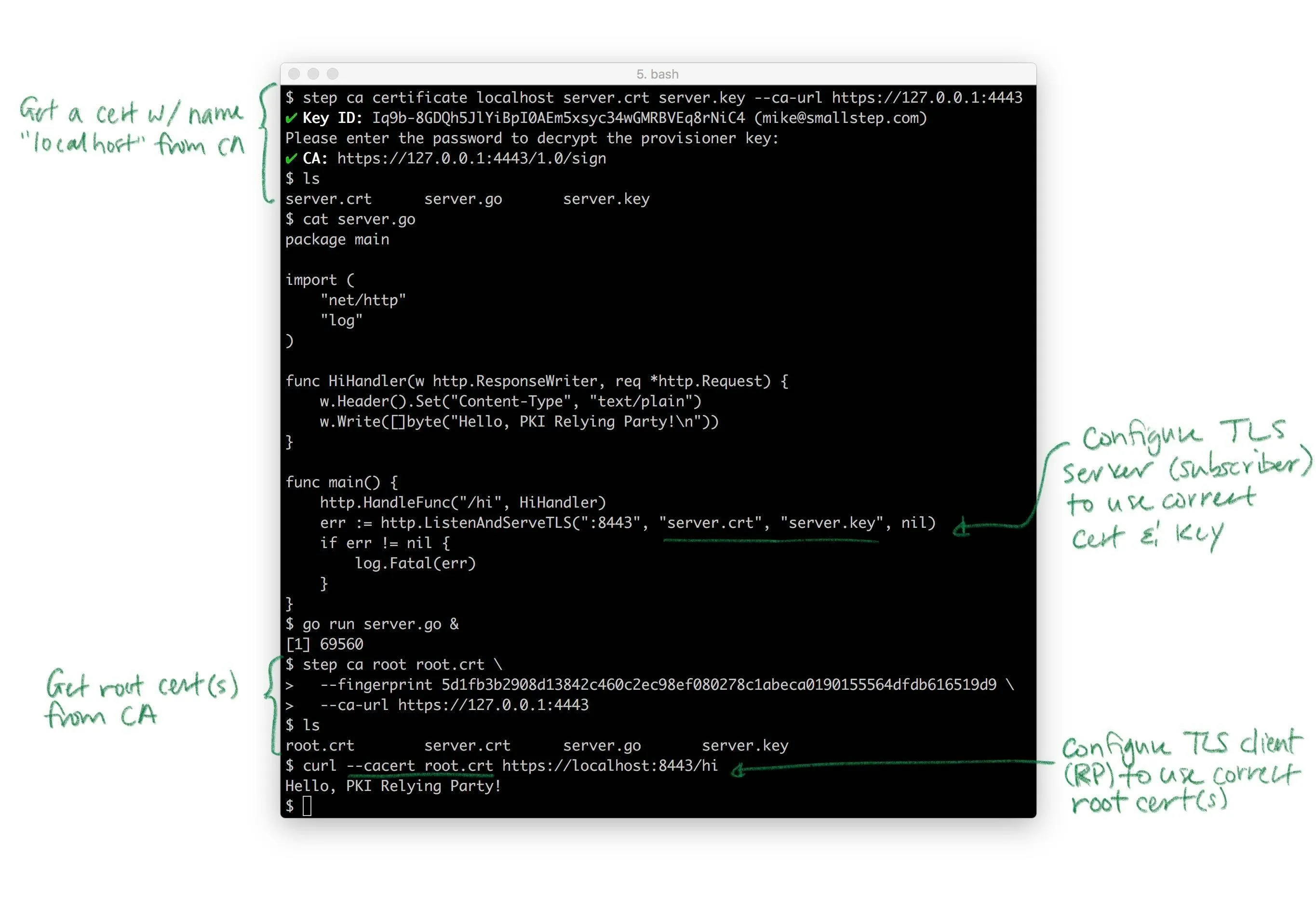
Pretty much every TLS client and server takes these same parameters. Almost all of them punt on the key and certificate lifecycle bit: they generally assume certificates magically appear on disk, are rotated, etc. That’s the hard part. Again, if you need that, that’s what step certificates does.
几乎所有的 TLS 客户端和服务器都使用这些相同的参数。它们几乎都回避了密钥和证书生命周期的部分:它们通常假设证书会神奇地出现在磁盘上,会被轮换等。这才是困难的部分。再次强调,如果你需要这些功能,那就是步骤证书的作用。
In Summary
总结
Public key cryptography lets computers “see” across networks. If I have a public key, I can “see” you have the corresponding private key, but I can’t use it myself. If I don’t have your public key, certificates can help. Certificates bind public keys to the name of the owner of the corresponding private key. They’re like driver’s licenses for computers and code. Certificate authorities (CAs) sign certificates with their private keys, vouching for these bindings. They’re like the DMV. If you’re the only one who looks like you, and you show me a driver’s license from a DMV I trust, I can figure out your name. If you’re the only one who knows a private key, and you send me a certificate from a CA I trust, I can figure out your name.
公钥密码学让计算机能够在网络上“看见”。如果我有一个公钥,我就能“看见”你拥有相应的私钥,但我自己不能使用它。如果我没有你的公钥,证书可以帮助。证书将公钥与相应私钥的所有者名称绑定在一起。它们就像计算机和代码的驾照。证书机构(CA)用它们的私钥签署证书,为这些绑定作证。它们就像车辆管理部门。如果你是唯一一个看起来像你的人,并且你向我展示一张来自我信任的车辆管理部门的驾照,我就能知道你的名字。如果你是唯一一个知道私钥的人,并且你向我发送一张来自我信任的 CA 的证书,我就能知道你的名字。
In the real world most certificates are X.509 v3 certificates. They’re defined using ASN.1 and usually serialized as PEM-encoded DER. The corresponding private keys are usually represented as PKCS#8 objects, also serialized as PEM-encoded DER. If you use Java or Microsoft you might run into PKCS#7 and PKCS#12 envelope formats. There’s a lot of historical baggage here that can make this stuff pretty frustrating to work with, but it’s more annoying than it is difficult.
在现实世界中,大多数证书都是 X.509 v3 证书。它们使用 ASN.1 定义,通常以 PEM 编码的 DER 格式序列化。相应的私钥通常表示为 PKCS#8 对象,也以 PEM 编码的 DER 格式序列化。如果你使用 Java 或 Microsoft,可能会遇到 PKCS#7 和 PKCS#12 信封格式。这里有很多历史遗留问题,可能会让处理这些内容变得相当令人沮丧,但它更令人烦恼而不是困难。
Public key infrastructure is the umbrella term for all the stuff you need to build and agree on in order to use public keys effectively: names, key types, certificates, CAs, cron jobs, libraries, etc. Web PKI is the public PKI that’s used by default by web browsers and pretty much everything else that uses TLS. Web PKI CAs are trusted but not trustworthy. Internal PKI is your own PKI that you build and run yourself. You want one because Web PKI wasn’t designed for internal use cases, and because internal PKI is easier to automate, easier to scale, and gives you more control over a lot of important stuff like naming and certificate lifetime. Use Web PKI for public stuff. Use your own internal PKI for internal stuff (e.g., to use TLS to replace VPNs). Smallstep Certificate Manager makes building an internal PKI pretty easy.
公钥基础设施是指所有用于构建和商定以有效使用公钥所需内容的总称:名称、密钥类型、证书、CA 机构、定时任务、库等。Web PKI 是默认被网页浏览器及其他几乎使用 TLS 的设备所使用的公钥基础设施。Web PKI 的 CA 机构是可信的但不可靠的。内部 PKI 是你自己构建和运行的 PKI。你需要它,因为 Web PKI 并非为内部使用场景设计,而且内部 PKI 更容易自动化、更容易扩展,并且让你对命名和证书生命周期等重要事项有更多控制权。将 Web PKI 用于公共事务。将你自己的内部 PKI 用于内部事务(例如,使用 TLS 来替代 VPN)。Smallstep Certificate Manager 让构建内部 PKI 变得相当简单。
To get a certificate you need to name stuff and generate keys. Use SANs for names: DNS SANs for code and machines, EMAIL SANs for people. Use URI SANs if these won’t work. Key type is a big topic that’s mostly unimportant: you can change key types and the actual crypto won’t be the weakest link in your PKI. To get a certificate from a CA you submit a CSR and prove your identity. Use short-lived certificates and passive revocation. Automate certificate renewal. Don’t disable certificate path validation.
要获取证书,你需要命名一些东西并生成密钥。使用 SANs 来命名:DNS SANs 用于代码和机器,EMAIL SANs 用于人员。如果这些不适用,使用 URI SANs。密钥类型是一个重要但大部分不重要的话题:你可以更改密钥类型,实际的加密不会成为你 PKI 的薄弱环节。要从 CA 获取证书,你需要提交 CSR 并证明你的身份。使用短期证书和被动吊销。自动化证书续期。不要禁用证书路径验证。
Remember: certificates and PKI bind names to public keys. The rest is just details.
记住:证书和 PKI 将名称与公钥绑定。其余的都是细节。